
Scenario Settings
Scenarios are named sets of different assumed parameters (projection, price, expense, etc.) that are used to evaluate groups of cases (ex: SEC reserves, Third Party Engineering Review, Bank audit, internal, etc.). Scenarios are useful because they can allow users to apply a base set of economics to a newly created case or to quickly switch back and forth between two or more completely different sets of economics. Qualifiers are the named and saved inputs that you can vary within a scenario. Scenarios & Qualifiers Explanation gives a more in depth description of scenarios and their uses.
How Do I Adjust the Discounting and Report Settings for Each Scenario?
Go to the Database Settings Ribbon and click on Scenarios and click “Edit” to enter Edit Mode. The Settings tab will open by default as shown below.
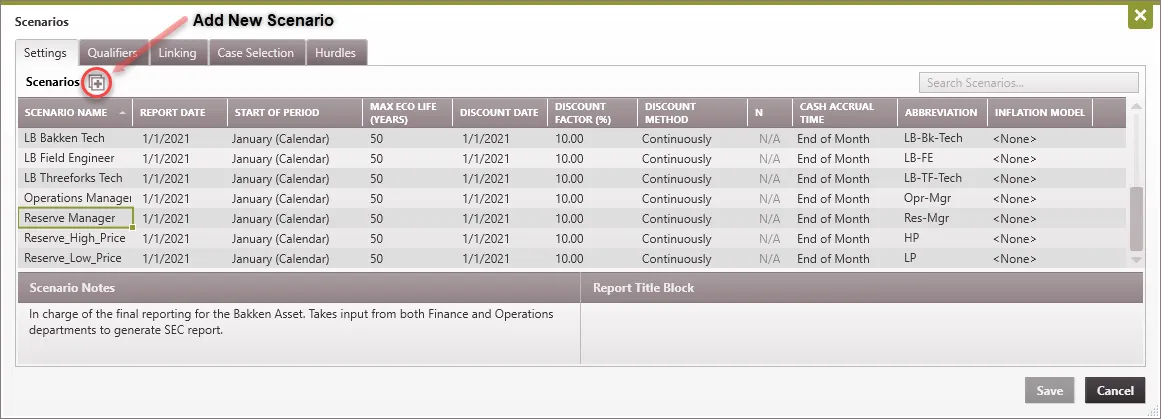
The Settings for Each Scenario are:
- Scenario Name – This is the name of the scenario that will show up on some reports.
- Report Date This is the date that the economic reports will begin.
- Start of Period – This will be the start of the period for fiscal reports (you can choose the first month of the fiscal year). Selecting January defaults to calendar year.
- Max Eco Life (Years) The number set here is the maximum number of years that any case in the database will run. By default, it is set to 50 but can be adjusted if users do not want the cases cut off early.
- Discount Date – The date that the cash flows are discounted back to.
- Discount Factor (%) This is the discount factor used for annual and monthly reporting. PHDwin uses a nominal annual discount rate, which includes inflation. This is different than the effective rate, which would be equivalent to compounding once a year. The effective rate is always either equal to or slightly higher than the nominal rate. The effective rate can be determined by the number of compounding entries. For example, compounding twice per year leads to a lower effective rate than compounding daily.
- Discount Method Discounting can either be set to be Continuous or Discrete (n Times a Year) which changes the formula used. You can see more information on the calculation in the following section of this topic.
- N If N Times per Year is chosen for the discount method, users will have to enter the value for N or number of compounding per year. Ex: 12 = Monthly, 365 = Daily, 1 = Annually.
- Cash Accrual Time – This input controls when the discounting occurs for all reoccurring revenues and expenses. The options are either the Mid-Month or End-Month. These periods are adjusted for actual day count in each period/month (including leap years). Any investments/Capital Expenditures on the case will be discounted to the actual date of the investment.
- Abbreviation – This is useful when displaying projections for a case that resides in multiple scenarios. The abbreviation would be added as an endpoint label to show what scenario a particular curve is associated with.
- Inflation Model – A percent escalation model can be selected and used to inflate investments across the scenario. Cases can inherit this scenario inflation model. A case can also have case-specific inflation model or no model.
Scenario Notes and Report Title Block
You can choose to enter notes about each scenario input by clicking on the name of the scenario. Once you have clicked on the scenario you would like to enter notes for, you can go down to the Scenario Notes section at the bottom, click into the box, and begin writing your notes.
- Scenario Notes These can be used to make any notes on what the scenario is for, especially if you are working in a database with several different users.
- Report Title Block This is a space where users can add a bit of customization to reports. If you enter text here, it will show up at the top of most economic reports.
How Are Discounted Values Calculated in PHDwin?
The Scenario Settings affects how discounted values are calculated in PHDwin. Discounted values relate to the time value of money – the idea that a dollar today is worth more than a dollar tomorrow. So, a future value can be discounted to see how much it would be worth in today’s dollars. There are two discounting methods that you can choose from in PHDwin; Continuous or Discrete.
The Monthly Cash Flow for the reoccurring monthly revenues and expenses is discounted separately from the one-time investments. Monthly Cash Flow is discounted from either the middle or the end of the month depending on the cash accrual timing chosen. Investments are discounted back to the actual day that they occur using the same formula but a different value for “d” than the Monthly Cash Flow. This ensures that the large one-time investments are not grouped together with Monthly Cash Flow and over- or under-discounted. For example, if an investment occurs on January 5, it should not be discounted on January 31 with the rest of the Cash Flow. This would result in an over-discounted investment amount and an inaccurate net present value (it would look higher than it truly should be).
PHDwin does not use the same calculation as excel and you must separate the monthly revenues and expenses from one-time investments.
Discrete (“n times per year”) Discounting Method
If you choose “n times per year” as the discounting method in the scenario settings of PHDwin, you must also specify:
- the value of “N” which is the number of compounding periods per year.
- the cash accrual timing which can be mid-month or end-month.
These values will be input into the following formula to calculate the discounted numbers.
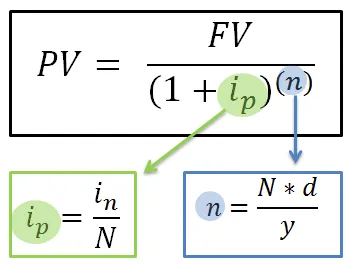
Where:
- PV = Net Present Value – entered in monetary units
- FVn = Future Value of the cash flow for the time period (n) – entered in monetary units – (as noted, the present value of investments must be calculated separately from the monthly cash flow)
- ip = (in / N) = discount rate per compounding period – entered as a decimal. In PHDwin, this is figured out by taking the annual nominal discount rate that is entered in the Database properties and dividing it by the number of compounds per year(see variables in and N below).
- in = annual nominal discount rate – entered as a decimal
- N = Number of compounding periods per year
- n = (N*d/y) = period number. In PHDwin, this is determined by taking the number of compounds per year and multiplying by the number of days from the Discount date to the accrual date (accrual date will either be mid-month or end-month depending on the cash accrual time set in scenario properties) and then dividing by the normalized year constant to find the appropriate period number (see variables N, d and y below)
- N = Number of compounding periods per year
- d = number of days from the Discount date to the compound date (either mid or end of each month depending on accrual time in scenario properties).
- y = 365.25 = normalized year constant
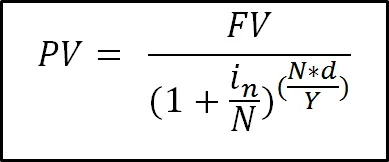
Once the substitutions above are made, you can see the integrated discrete discounting formula:
Sample Calculation:
If we assume the following settings are entered, we can calculate the net present value of a future value of cash flows.
Discounting Settings and Cash Flows
- Discount date = Jan 1, 2014
- Cash accrual time = necessary to determine the value of D = End of Month
- in = annual nominal discount rate = 8% = 0.08
- N = number of compounds per year = 12
- FV1 = Operating Cash flow for January 2014 = $100,000
- FV2 = Investment on January 5th = $150,000
- FV3 = Operating Cash flow for February = $180,000
- D1 = number of days from discount date until compound date for January cash flow = days from 1/1/14 to 1/31/14 = 31
- D2 = number of days from discount date until compound date for February cash flow= days from 1/1/14 to 2/28/14 = 59
- D3 = number of days from discount date until compound date for January investment = 5
Calculations
PV = Disc. January Operating Cash Flow – Disc. January Investment + Disc. February Operating Cash Flow
PV = $100,000 / [1 + (.08/12)] ^ [(12*31)/365.25] – $150,000 / [1 + (.08/12)] ^ [(12*5)/365.25] + $180,000 / [1 + (.08/12)] ^ [(12*59)/365.25]
PV = $99,325.55 – $149,836.36 + $177,696.51
PV = $127,185.70
The process above can be repeated for each month of PHDwin cash flows to match the present value calculated by the program.
Continuous Discounting Method
If you choose “continuous” as the discounting method in the scenario settings of PHDwin, you must also specify:
- the discount factor
- the cash accrual timing which can be mid-month or end-month.
These values will be input into the following formula to calculate the discounted numbers.
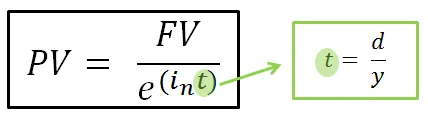
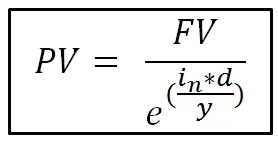
Where:
- PV = Net Present Value – entered in monetary units
- FVn = Future Value of the cash flow for the time period (n) – entered in monetary units – (as noted, the present value of investments must be calculated separately from the monthly cash flow)
- e = 2.71828182846
- in = annual nominal discount rate – entered as a decimal (this is entered in the Database Properties)
- t = (d/y) = period number – in PHDwin this is taken by finding the actual number of days from the discount date until the compound date divided by the normalized year constant (see d and y below)
- d = number of days from the discount date (entered in Database properties) to the compound date (either mid or end of each month depending on accrual time in Database Properties).
- y = 365.25 = normalized year constant
Once the substitutions above are made, you can see the integrated continuous discounting formula:
Sample Calculation
If we assume the following settings are entered, we can calculate the net present value of a future value of cash flows.
Discounting Settings and Cash Flows
Discount date = Jan 1, 2014
Cash accrual time = necessary to determine the value of D = Mid-Month
in = annual nominal discount rate = 12% = .12
e = 2.71828182846
FV1 = Operating Cash flow for January 2014 = $300,000
FV2 = Operating Cash flow for February = $335,000
FV3 = Investment on January 7th = $460,000
D1 = number of days from discount date until compound date for January cash flow = days from 1/1/14 to 1/15/14 = 15
D2 = number of days from discount date until compound date for February cash flow= days from 1/1/14 to 2/14/14 = 45
D3 = number of days from discount date until compound date for January investment = 7
Calculations
PV = Disc. January Operating Cash Flow – Disc. January Investment + Disc. February Operating Cash Flow
PV = $300,000/{2.71828182846^ [(.12 * 15)/365.25]} – $460,000/{2.71828182846^ [(.12 * 7)/365.25]} + $335,000/{2.71828182846^ [(.12 * 45)/365.25]}
PV = $298,525.20 – $458,943.31 +$330,083.66
PV = $169,665.55
The process above can be repeated for each month of PHDwin cash flows to match the present value calculated by the program.