
General Info
The General Info form contains common information that identifies a case. It can be used to enter information about the case such as Case Name, Operator, Well, Field, Reservoir, County, State, Country, Total Depth, Spacing, Location, Well Type, Class, Category, and Sub-category. Several of these information, will be attached to the case when it is downloaded from DrillingInfo or from a different database, but you are able to modify any field in the general info.
Where do I modify header information?
Click on the Forms Flyout and double-click on General Info or drag it somewhere on the screen.
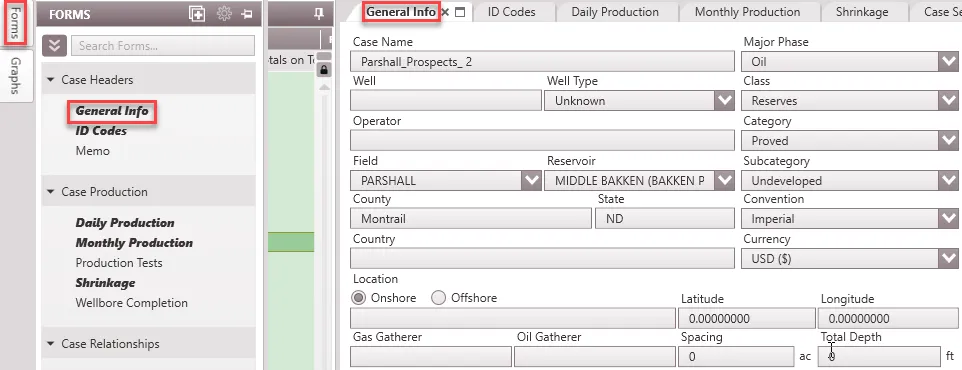
General Info Inputs
•Case Name– The name of the case that is displayed on the Case List.
•Major Phase – This identifies the major product produced by the well. The choices are Oil, Gas, Water, and NGL.
•Well – The well number associated with the case.
•Well Type – The type of well associated with the case. It must be Flow, INJ (Injector), Pump, Source, SWD (Salt Water Disposal) or Unknown.
•Classification – The classification selected here must be one of the available groups listed. These have been set up based on the Petroleum Resources Classification Framework in the 2018 update of PRMS. The default classifications are Reserves, Contingent Resources and Prospective Resources. Users have the ability to set up custom classifications in the Database Settings – Classifications & Categories.
•Operator – The Oil and Gas company operating the well. Typically, this party has the majority working interest in the case.
•Category – Depending on the Class selected, there are categories specified by PRMS. For the Reserves class, the categories are proved, probable and possible. See page 7 of the 2018 update of PRMS. Users have the ability to set up custom categories in the Database Settings – Classifications & Categories.
•Field – This is the field the case is producing from. The field name comes preset depending on the data source. However, users can set up field names in the Database settings – Fields, Reservoirs & Zones.
•Reservoir – This is the reservoir the case is producing from. The reservoir name also comes preset depending on the data source. However, users can set up reservoir names under a given fields in the Database settings – Fields, Reservoirs & Zones.
•Sub-category – Depending on the Category selected, there are sub-categories specified by PRMS. Sub-categories for the proved category include: producing, behind pipe, undeveloped, non-producing, shut-in, and injection. See the 2018 update of PRMS for more information. Users have the ability to set up custom sub-categories in the Database Settings – Classifications & Categories.
•County – The county in which the case is located.
•State – The state (if United States) in which the case/well is located.
•Convention – The unit convention used for the case. Changing the convention will only change the unit labels and will not recalculate any affected items Note that the report also has a units setting used to display the cash flow. The cases can have different unit settings, but the report will have only one unit type and all cases will be converted to the report unit for final cash flow output. The convention specified here must be one of the available conventions set up in the Database settings – Conventions. The available conventions are Imperial and SI units.
•Country – The country in which operations are taking place for that particular case/well.
•Currency – The currency used for the case. Changing the currency will only change the label and will not recalculate any affected items. For example, changing from $ to £ retains all values in price, expenses, etc, only the unit is updated. However, when the report is generated, the conversion is applied. Note that the report also has a currency setting used to display the cash flow. The cases can have different currency settings, but the report will have only one currency and all cases will be converted to the report currency for final cash flow output. The currency entered here must be one of the available currencies already set up in the Database settings – Currencies. Users can update the currency settings to the prevailing conversion rate for accurate results.
•Location – The block and section that the case is located. There is a specific location format that is the default when cases are imported from DrillingInfo, but this may be changed here to be more specific.
•Latitude – The latitude of the case location coordinate.
•Longitude – The longitude of the case location coordinate.
•Gas Gatherer – The company that will be receiving the gas that comes out of the well. It is usually a midstream or natural gas company.
•Oil Gatherer – The company that will be receiving the oil that comes out of the well. This is sometimes the same as the operator.
•Spacing – The drilling spacing of the well in acres should be specified here. 40 acre, 160 acres, 640 acre, 1280 acre spacing are typical values for vertical and horizontal wells.
•Total Depth – The total depth of the well. This is different from the true vertical depth. The units for depth will correspond with the unit Convention that is applied to this case
Setting up lists for the drop-down menus
Notice that when specifying the Field, Reservoir, Major Phase, Class, Category, and Sub-category, there is a set list in the drop-down menu to choose from. To edit those lists, go to the Database Settings Ribbon and click on Classifications & Categories or Fields, Zones & Reservoirs. The Major Phase list will always be the same: Oil, Gas, Water, and NGL.