
Working with Multiple Users
PHDwin is designed so that multiple users can work in the same database at the same time. If a user is editing a certain case, another user can still double-click on the case to view the inputs, but the case will be read-only and locked for editing. Once the other user navigates out of the case, someone else will be able to edit it. If multiple users are “waiting” to edit the case, they will be granted read/write access in the same order that they activated the case.
How to Know if Another User is Editing a Case?
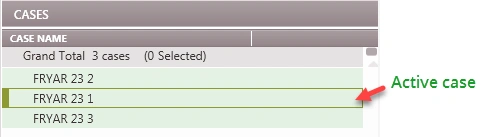
When viewing the case list, the active case being edited is shown with a green border around it.
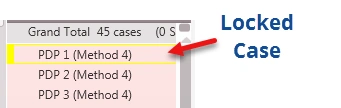
Any Case that is being edited by another user has a yellow border around it.
To see which user is editing the case, hover over the lock icon on the status bar at the bottom of the program.

What Happens During Global or Grid Edit with Multiple Users?
If you’re working in a database with other users, the Grid Editor cannot make changes to a case that someone else is editing. To avoid this, use the chat feature to ask the user to either move to a different case or temporarily log out of the database. If a case you are trying to update is being edited by another user, it will be locked for editing, and therefore any changes you make cannot be saved. However, even if you are unaware that there are other users in the database, you will get a notification in the Grid Editor Error Report that contains the cases that were not updated due to this issue.