
Memos
Memos are attached to particular cases and are used to keep track of the specifics or notes on each case. This is useful for organizing large databases, and when multiple users are working on the same project file.
For example, if you would like to make notes about a particular case or well that obtained more information on the ownership values, this may be done in the Memo form of the case as shown below.
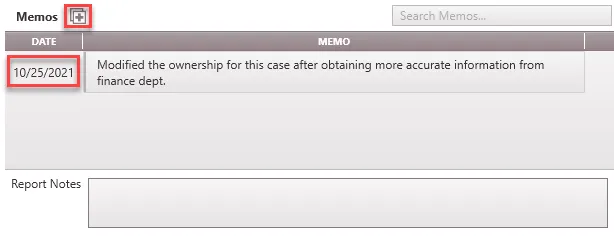
How to Add a New Memo
1. Click on the Forms fly-out and double-click on the Memo form.
2. Click the  button next to Memos
3. Double-click the empty field under Memo and type in the note on about the case.
4. When adding a new memo, the current date is automatically attached to it. This could be modified if the memo is referring to an event from a previous date. To do this, double-click on the date and type in the appropriate date.
Add report notes at the bottom of the memo form to see these updates on the report.