
Inserting Special Characters
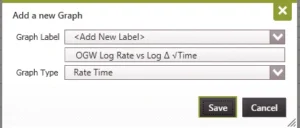
Most of the labels and inputs in PHDwin will support the use of special characters. For example, it is possible to label a graph as “Delta Square Root Time” using the symbols (Δ√) instead of the full description, so that it looked like the image below:
NOTE: Special characters should be avoided in custom stream names, cash formula names, and static variable names.
How to insert special characters
To insert a special character or symbol, use one of the methods below:
•Go to the Windows Menu, type in Character map and click on the desired Character to use, Then click Copy and paste it into the field in PHDwin.
•Use a web browser to search for the character, then copy and paste it into the field in PHDwin.
•Use Microsoft Word. Go to Insert>Symbol and choose the special character. Then copy and paste it into the field in PHDwin.