Database Settings
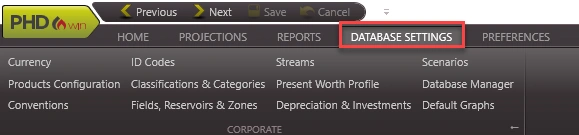
The Database Settings can be found on the Database Settings ribbon. The Database settings are mainly used to manage scenarios, phase configurations, and other settings applied to cases in the database.
What is Included in the Database Setting?
·@Currency – manage conversion rates from one currency to another and add changing rates over time.
·@ID Codes – manage, add, or delete ID code labels for all cases.
·@Streams – view the default or add custom streams.
·@Scenarios – add new Scenarios and manage all settings including Qualifiers, Links, Case Selection, and Hurdles.
·@Products Configurations – set up the products for each Phase Configuration.
·@Classification Categories – arrange the pick list and hierarchy of categories.
·@Present Worth Profile – specify the discount values to display in the present worth profile when running reports.
·@Conventions – set up the units for each product.
·@Investments & Depreciation – set up investment categories and how they should report and depreciate.
·@Fields, Reservoirs & Zones – manage the list available for cases in the database.
All changes made in the Database Settings are automatically saved (except for Scenarios which requires users to click the Save button). There is no way to ‘undo’ the changes made, but you can always switch them back or restore to a backup with the proper settings. To do this, users need to have backed up their database through the @Database Manager .
In order to make changes in the Database Settings options, users must enter Edit Mode by clicking on Edit in the selected option. In each of the various Database Settings dialogs, only one person (usually the Database Administrator) may be allowed to edit at any given time. When Edit Mode is entered, it essentially locks every other user out of the database, except the individual in Edit Mode.