
Ownership
The ownership form can be used to edit the initial ownership on the case and schedule reversions, or changes in ownership, into the future. You might want to schedule a reversion in the future if you know there will be a change in working or royalty interest due to the buying or selling of interests. This allows you to assess the feasibility of buying or selling a portion of the assets and analyze how it affects the cash flow projections.
The method in which reversions are calculated varies slightly from PHDwin 2.10. Previously, if a reversion trigger was set in the middle of a month, the reversion would occur on that exact date. However, in Version 3, the reversion will now occur at the start of the following month, per SPEE Recommended Evaluation Practice #8. For example, if a reversion was set at a payout amount and the payout occurred on 10/15 in PHDwin 3, the ownership will not change until 11/1.
The ownership can be qualified by scenario (similar to partnerships in previous versions of PHDwin). Ownership qualifiers and scenarios allow you to evaluate cases with different ownership interests. You can view or change the current ownership qualifier by going to the scenario hierarchy.
To Edit the Ownership
Go to the Forms Flyout and double-click on the Ownership form.
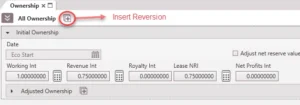
Initial Ownership
The initial ownership begins at the case’s economic start date. It will continue until the economic limit unless there is a reversion scheduled. Make sure to set up the following values correctly.
•Working Interest (WI) – The % of expenses that you are obligated to pay according to your ownership in the well. It should be entered as a fraction between 0.0 and 1.0. For a royalty case owned by a purely royalty holder, this value would be 0.
•Revenue Interest (RI) – The % of production and therefore revenue that you are entitled to. It should be entered as a fraction between 0.0 and 1.0.
•Royalty Interest – The % specified as a royalty. Typically this will represent the revenue interest paid to royalty holders, which is often a landowner, who does not have any share of the costs. This value can also be an additional royalty for a working interest owner that has been designated in the contract. It should be entered as a fraction between 0.0 and 1.0. This input can also be used to model an overriding royalty or any additional burden (see below). We recommend you use the royalty interest field for this purpose, rather than updating the RI field to account for any additional burden. In this situation, we support fractions between -1.0 to 1.0. RI + Royalty must be between 0 and 1.
•Lease NRI (Net Revenue Interest) – The total amount of Revenue Interest available to the 100% working interest owner. This is typically 100% minus any royalty holder’s share. This value is used solely to calculate the economic limit of the case on the date at which the 100% owner would reach the maximum cumulative cash flow. Once this economic limit date is determined, the reports will generate net numbers based on the working, revenue and royalty interest entered. This number MUST be populated in order for reports to run. If you leave the Lease NRI to zero, the case will not run.
•Net Profits Interest (NPI) – The net profits interest can be entered as a positive or negative value between -1.0 and 1.0.
oNet profits amount = (Revenue – Expenses – Taxes) * Net profits interest
oA negative value would model an additional expense on the case – something that you are obligated to pay. The expense is calculated as a percentage of net profits, which is the percentage value you would enter here. This expense does not affect the economic limit of the case.
oA positive value would model the person receiving the percentage of net profits, which would be revenue to them. In this case, everything on the report except the revenue from net profits would be equal to zero.
oNet profits are only modeled for months in which the profit is positive. In addition, if there are months where the cash flow is negative (for example due to investments), the net profits will not be paid until those costs are recovered and the profit is positive again.
•Adjust net reserve value – (only applicable if you are modeling net profits) – this is a way to adjust the volumes based on who should book the reserves. If you check this box, the reported net volumes will be adjusted by the volume equivalent to the net profits paid (or received). This is done by taking the amount of the payment, splitting it amongst the products that generate revenue and back-calculating the reserves that would be associated with the revenue lost (or paid to you) using the current price of the product. For example, if the net profits are treated as an expense worth M$100 and the price of oil is $50/bbl, net reserves will be reduced by a 2Mbbl.
Summary of General Rules for Ownership set up
•WI, RI, and LNRI must be between 0 and 1.0 (inclusive).
•Royalty and NPI must be between -1.0 and 1.0 (inclusive).
•RI + Royalty must be between 0 and 1.0 (inclusive).
Calculator icon 
This can be used to calculate any field based on the other two fields using this relationship between the Working Interest, Revenue Interest (RI), and Lease NRI. The royalty interest, if any, has no impact on this calculation. Any 2 of the 3 parts of the following equation must be populated in order to calculate the third value.
Revenue Interest = Working Interest * Lease NRI
Override and Burden
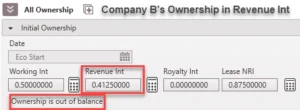
If the values in the fields are not equal according to the above equation, a message is displayed indicating that “Ownership is out of balance”. This happens if the case carries an additional burden or override which the user models using the revenue interest cell. An override occurs when an owner has a higher revenue interest than that defined by the above equation. A burden is the opposite situation. It occurs when the owner has a lower revenue interest than that defined by the above equation.
There are two ways to model these interest types in PHDwin: through the Revenue Interest cell and through the Royalty Interest cell. The royalty interest method is the recommended approach for this purpose because using this method makes it much easier to identify the override/burden amount for the case, and it is shown on the report.
Revenue Interest: To model an override using the Revenue Interest (RI) cell, add the override amount to the existing RI without adjusting the other two values in the equation. To model a burden, subtract the burden amount from the existing RI without adjusting the other two values in the equation. Although the ownership form displays the “Ownership is out of balance” message when this happens, the program will run as expected and the cash flow report will indicate that the correct numbers were calculated.
Royalty Interest: To model an override using the Royalty Interest cell, input the override amount in the royalty interest cell as a positive number (for example 0.05 for a 5% override). For a burden, input the override amount in the royalty interest cell as a negative number (for example -0.05 for a 5% burden). These values are out of a 100%. For example, company A receives 100% of a deal from a landowner with a 12.5% royalty burden. Company A sells 50% of the deal to company B, retaining a 5% override (5% of 50%). Hence, company B’s burden is 2.5%. The ownership form of company A and company B will be set up as shown below for both methods:
Reversion
A reversion refers to a change of ownership interest or when one form of ownership is converted to another form of ownership after certain conditions have been met. For example, if an override is converted to a working interest after payout of the initial investments, this is referred to as a reversion, or back-in. In PHDwin, three conditions under which a reversion can occur are payout, cumulative production, and a specified Date. Examples are provided below.
Payout: Reversion Payout, or recovery of investment through profits (after production taxes but not including investments), must occur to initiate the change in ownership interests. It can be a gross or net calculation depending on if you want it calculated based on a lease basis or the effective ownership set up in the ownership form of the case (see Balance under How to Add a Payout Reversion below). For example, assuming no burdens or overrides, if you have an 80% case (Case NRI = 80%), then the reversion occurs when 80% of the revenue minus 100% of the expenses and taxes equals the amount entered when the reversion is calculated from gross profit. If the reversion is calculated from net profit, then the reversion occurs based on the effective interest specified in the ownership form of the case. The amount specified is measured in M$ (thousands of dollars) and is entered in the Trigger field of the appropriate reversion on the Ownership Tab of the Case. You can optionally incorporate investment into the reversion payout calculation. Note that payout is calculated using non-discounted cash flow (See Payout section under Economic Indicators Calculations).
Cumulative production: When an established cumulative volume of a specified product (oil or gas, including historical volumes) is reached, the ownership interests will change.
Date: Ownership interests change after a predetermined date.
Continuing the previous example with a small update. For example, company A receives 100% of a deal from a landowner with a 12.5% royalty burden. Company A sells 100% of the deal to company B, retaining a 5% override (5% of 100%) which reverts to a 25% WI when the following condition is met:
a. Payout is reached
b. Cumulative production of oil has reached 10,000 barrels of oil
c. 18 months from first oil (First oil date is 1/1/2022)
The ownership form of company B will be set up as shown in each sub-section below for all three cases.
A. How to Add a Payout Reversion
Payout reversion can be used to change the ownership on the case once the case’s profit reaches a certain value that you specify. Payout reversion can be different from the economic indicator payout. An example of where they could be different is when a party incurs a penalty which requires a certain amount beyond the actual investment cost to be recovered before reversion can occur.
Profit = Revenue – Expenses – Taxes (with the option to include investments).
Per the SPEE Recommended Evaluation Practice #8, the actual payout reversion may happen mid-month, but the ownership change will happen the first day of the month following the month of the reversion.
To add a payout reversion
1.Click on the  button next to All Ownership at the top of the ownership form and choose Payout:
2.Enter the following reversion values:
•Balance – specify if the payout reversion is calculated from Gross or Net profit. If you choose gross, the profit is calculated for 100% ownership. The Lease NRI dictates the revenue for the 100% owner. A non-operator with a back-in, for example, could use gross to determine when payout reversion should take place since they do not have any volumes to calculate payout reversion. If you choose net, the profit is calculated based on the effective interest specified in the ownership form of the case.
•Value (M$) – the profit the case must make to trigger the reversion. This will most likely always have some number specified and would not be zero. It is typical to input the penalty for going non-consent here, or the penalty plus investments if the investment option discussed next is unchecked. As the case comes online and some of the investments and penalty have been recovered, you would only need to specify the payout balance for the reversion to calculate the correct date.
•Include Investments – by default, the program does not take out investments in order to calculate the payout. If you check this box, it will include the investments in the payout calculation. For example, if you enter $1 (.001M$) for the value, you can choose to include the investments and the well will reach payout when the cash flow becomes positive (at .001M$).
•Charged Interest (% APR) – the nominal interest rate of borrowing money for an expense, that is then added to on top of the reversion value. The value inputted is a nominal annual rate, which means 1/12th of the entered value will be used to uplift the carry forward balance at the end of each month. The reversion will be triggered when the payout value plus the additional charged interest are recovered. This reversion method can be used for back-ins after a payout of the loans. This value can be compared to how a discount rate with n = 12 works.
•Discount Rate – if you are calculating the reversion based on discounted cash flow, enter the discount rate used for the reversion. If the reversion is based on an undiscounted cash flow, leave this as zero. The discounting method will follow the settings for the scenario.
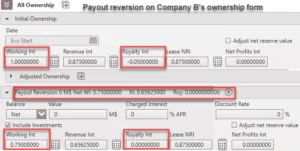
3.Enter the new ownership values (WI, RI, Royalty interest, & LNRI) for the case after the payout is reached.
The set up shown below is for the case study presented above. Important changes are highlighted. Net value is used. If the “include investment” option is unchecked, provide the amount that needs to be paid out. If there are interests related to this amount, it should be provided to recover the amount plus the interest.
B. How to Add a Reversion Based on Cumulative Production
Cum Reversions can be used to change the ownership once a certain product has produced a specified volume.
To add a cum reversion
1.Click on the button next to All Ownership at the top of the form and choose Cum:
2.Enter the following reversion values:
•Product – choose the product that this production-based reversion should be based on.
•Volume – enter the GROSS volume that must be produced in order to trigger this reversion – units are to the right of the “interest”.
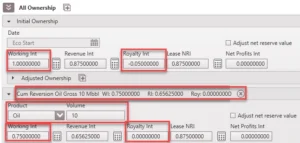
3.Enter the new ownership values (WI, RI, Royalty interest, & LNRI) for the case after the reversion is triggered.
The image below shows the set up for the example presented earlier. Be aware that the volume of oil is in Mbbl, gas in MMcf, water in Mbbl, and NGL in Mgal. Reversion is triggered when cumulative oil production reaches 10,000 bbl.
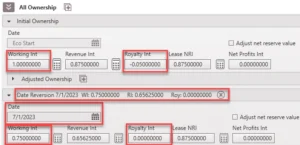
C. How to Add a Reversion Based on a Hard-coded or Linked Date
Date Reversions can be used to change the ownership on a specific hard-coded or linked date. This is very useful when the date at which a payout reversion occurred is known. You enter the hard-coded date using this option.
1.Click on the button next to All Ownership at the top of the form and choose Date.
2.Click on the calendar icon in order to enter a specific date or choose from a linked date.
3.Enter the new ownership values (WI, RI & LNRI) for the case after the reversion is triggered.
How to Add Product-Specific/Adjusted Ownership
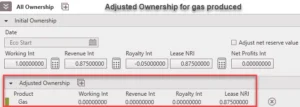
If you have to model a different interest for a specific product, such as gas, you can set up an adjusted ownership. To do so:
1.Click on the next to Adjusted Ownership.
2.Choose the appropriate product name.
3.Enter the adjusted ownership values for that product.
This can be done before and after a reversion occurs if applicable. In the set up below, company B does not receive revenue or pay for any cost associated with gas production, as a result adjusted ownership is used to model this scenario.
Custom Working Interest
Custom working interest is a powerful addition to PHDwin used to model very specific cases under the investment form. Investments are typically paid for according to the working interest of the parties in a deal. However, there are occasions when one partner (say partner A) is carried to, for example, the casing point. In such a case, the other partners split the cost of drilling the well. Partner A would have a zero working interest associated with the drilling cost. If there are two parties in the deal, partner B pays for 100% of the drilling cost. To model this in PHDwin, a custom WI of 0 and 1 are used by both partners for the cost of drilling the well..
To add custom WI, go to the investment tab. Add the appropriate investment as discussed under the investment form. Then click the check box for custom working interest and add the required value between 0 and 1. See the example below where partner A does not pay for the drilling cost.

Blended Ownership for Group Cases
For certain group cases, such as group economic limit (GEL) or Allocation GEL unit, blended ownership is calculated. See blended ownership for details on how those are calculated.
Further Explanation of Ownership Inputs
In order to understand the inputs in PHDwin, it is important to understand the relationship between the numbers and how those numbers impact the economics of the case.
•Working Interest is the % of the total expenses associated with drilling, completing, and producing the well that you are obligated to pay according to your ownership in the well.
•Revenue Interest is the % of the revenues that you are entitled to.
Single partnership Scenario
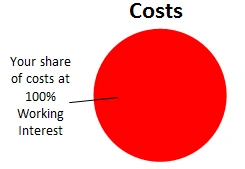
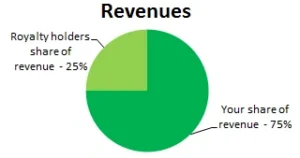
In the example above, you are the only working interest holder in the well. That means that you are obligated to pay 100% of the costs associated with the well. While you might infer this entitles you to 100% of the revenues, that is not usually the case.
A portion of your revenues will be paid out as royalties, which usually include the land owner(s) and mineral owner(s). In the past, it was common to promise 1/8th of the revenue to the landowner, and thus was born the term eight-eighths. This term today is generally used to imply the 100% working interest case, as shown in the example above, but the term is sometimes used more generically to refer to gross values, and rarely are they ever actually referring to anything divided into eighths. Unfortunately different people use it to mean different things, and therefore its usually a good idea to get clarification on what people mean by it.
As you can see in the example above, even though you are paying 100% of the costs on the well, you are only entitled to 75% of the revenue. What this also means is that when 75% of the revenues produced by the well cannot support 100% of the cost, the case becomes non-economic.
Multiple partnership Scenario
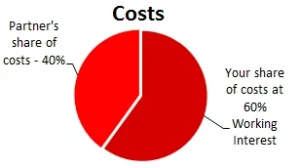
In this next example, you found a partner to help you with the costs of the well. You have a WI of 60%, and your partner takes on the other 40%. Since you are taking on a higher share of the burden, it is only fair that you get a proportionately higher share of the revenues.
60% of the cost does NOT entitle you to 60% of the revenues, though, since we still have to consider the royalty portion being paid out. So your 60% entitles you to 60% of the remaining 75% of revenues, thus you get a 45% RI, and your partner gets 30%.
The amount of available revenue, in this case 75%, is known as the Lease Net Revenue Interest (LNRI). The LNRI is defined as the Revenue Interest at the 100% Working Interest Case, which simply means the percent of revenues you would get if you were the only owner of the well.
Assuming no overrides, there is a mathematical relationship between the WI, RI and LNRI numbers.
RI = WI * LNRI
We have already seen the above equation in action – remember that in the second ownership example we discovered that your 60% working interest entitled you to 60% of the available 75%, and thus your revenue interest on the case was 45%!
60% * 75% = 45%
So why do we care what the LNRI is on the case? Arent we just interested in our share? Well, yes and no. We care about the LNRI because it serves a very important purpose – it calculates the economic limit on the case! PHDwin always uses 100% of the costs applied to a case, and compares them against the revenues on the case multiplied by the LNRI entered on the ownership tab. When the reduced revenues can no longer support the costs, the case is considered to have reached its economic limit.