Cash Formulas
Cash Formulas are user-created formulas that affect the economic calculation of a case and are case-specific. They allow modifications to the default calculations if needed, in order to change things, such as taxes, ownership reversion timing, and international PSCs. They offer a high degree of flexibility that allows users to have more control to model very specific economic calculations. Because Cash Formulas have access to the same global capabilities that exist throughout PHDwin, they can be defined and applied to many cases at once. Cash Formulas use Excel-like syntax, the economic tokens, and user-defined static variables to build equations. Formulas can be set up as a reference for other formulas to use or be reported as revenue, expense, or any other stream.
All Fiscal Models in PHDwin are done via Cash Formulas. Cash Formulas can be written to model things such as:
•Conditional fees – The fee changes based on some factor and the preference is to let it run automatically instead of having to figure it out and manually schedule it month by month.
•Adjusting the default calculations in the program – users can set up cost to be based off gross production instead of shrunk production.
•PSCs/International models – Most international models have things such as cost recovery, production splits, royalties, other fees, etc. These arent default and can be done using cash formulas.
To Create a Cash Formula Model
Cash Formulas Window
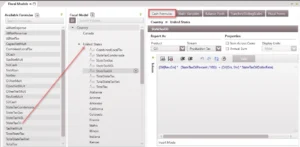
To add the Cash Formulas form to the current view, click on the Forms flyout and then double-click on Fiscal Models. On the left, there is a list of all of the models built in the database.
Adding a New Model
The models are arranged in a tree structure and only one model can be applied from each tree. To add a Fiscal Model for a country that isn’t listed, click on the  next to Country. If trying to model something in addition to the Fiscal Model for the case, click on the next to Miscellaneous. Once the model has been added, give it a descriptive name.
Adding Formulas to the Model
A list of available formulas is shown for the United States – users can drag and drop them from that flyout right on top of the model name.
Defining the Formulas
To write the formula – highlight the name of any formula to open the formula editor. This is where you can define the formula using the tokens and modifiers on the left. There are also some standard functions and special functions that might be helpful. Users also need to choose the following settings, like if and how to report it:
•Report As – Product & Stream – If this formula generates a value that should be reported, choose the product and stream it should be associated with. For example, if you are modeling a State Oil Tax, the product should be Oil, the stream would be Production Tax. If it is not tied to a particular product, choose All. If this formula should not be reported, choose Reference for the Stream and the product will automatically be switched to All.
•Sum Across Cases – If this box is checked, the results of the formula will be added together for summary pages.
•Annual Sum – If this box is checked, the results of the formula will be summed when looking at annual values, otherwise it will display the last month’s value.
•Display Units – Choose the display units that should be used to report this formula. Even though formulas can just be a reference, and not report as a certain stream, they can all still be individually reported to see the results of each formula.
Naming Cash Formulas & Static Variables
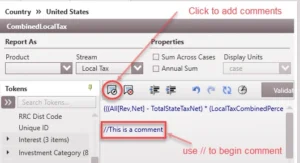
Any of the default tokens used to write the formulas are NOT case sensitive. The formulas will be saved as written with all spaces, tabs and linefeeds. Comments can be added to any formula by adding // in front of the comment. In addition, formula or static variable names:
•cannot contain any spaces (spaces are accepted for static variables in the GUI but are converted to underscores in the database). The actual formulas themselves can have as many spaces as necessary.
•do not support special characters like + or %
•cannot be the same as any product or investment category name – this will generate an error
•should not contain any SQL reserved words
•should not use one of the PHDwin reserved formula names unless it is intentional. The special reserved names include: CapexNetMult, CoWiNetMult, DCash, EcoCashFlow, GasNetMult, GasRevNetMult, NdCash, NetInvest, OilNetMult, OilRevNetMult, OpexNetMult, OtherNetMult, RevNetMult, or TaxNetMult.
Static variables are user-defined variables that are created on a case or global basis. The values of these variables remain constant for the entire life of the project. While the name of a static variable must be the same on every case, the actual value can differ between cases.
Adding Comments to Cash Formulas
To add a comment, or a note that explains the formula, type // or use the button ( ). Remove the // or use the button to the right (
 ) to remove the comment. The comment will always be for the entire line, make sure to hit Enter if the syntax continues to the line below the comment.