Default Reports

<< Click to Display Table of Contents >>

Navigation:  Running Reports >

Default Reports

Navigation: Running Reports >

hm_btn_navigate_prevhm_btn_navigate_tophm_btn_navigate_next

PHDwin has several default reports to select from for generating economic reports. Some reports come with additional options for selecting which production and economic values are displayed and which products are shown.

The following are the different types of reports to choose from:
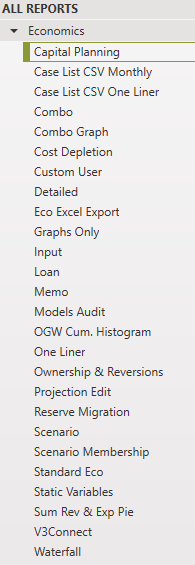
1.Capital Planning

2.Case List CSV Monthly Report Types

3.Case List CSV One Liner

4.Combo

5.Combo Graph

6.Custom User

7.Cost Depletion

8.Detailed

9.Eco Excel Export

10.Graphs Only

11.Input

12.Loan

13.Memo

14. Model Audit

15.OGW Cum. Histogram

16.One Liner

17.Ownership & Reversions

18.Projection Edit

19.Reserve Migration

20. Scenario Membership

21.Standard Eco

22.Static Variables

23.Sum Revenue & Expense Pie

24.V3 Connect

25.Waterfall