Navigation: Running Reports > Default Reports >


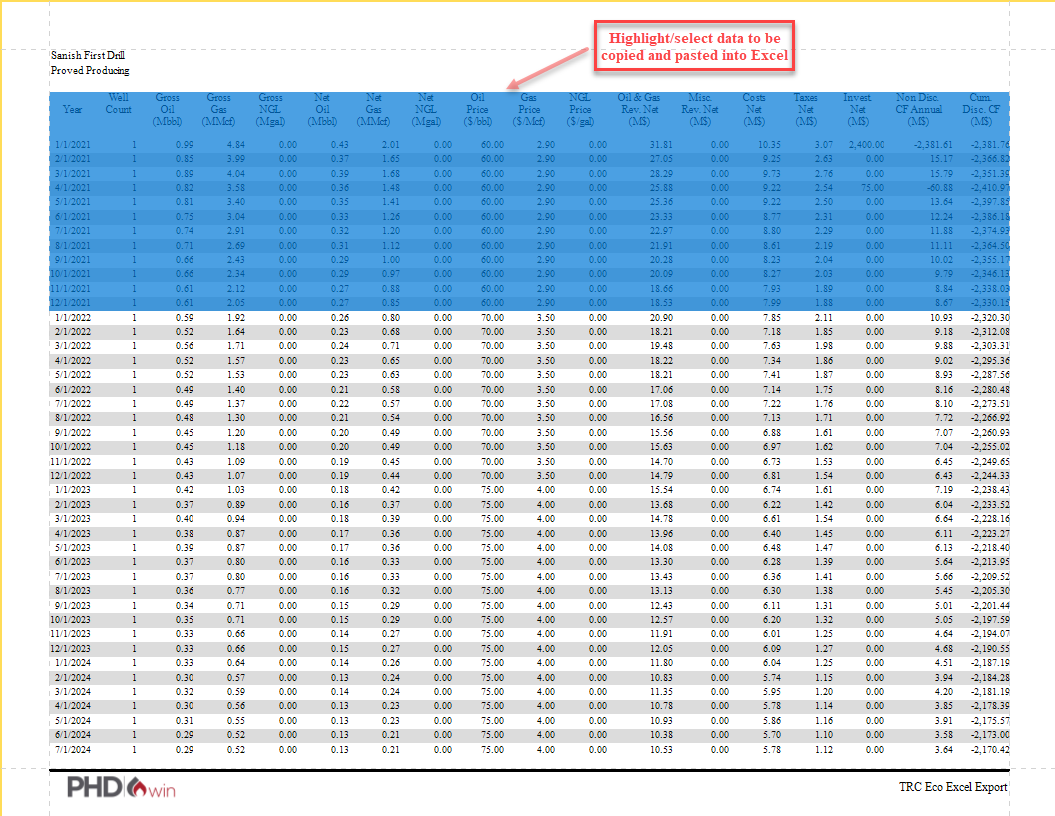
The Eco Excel Export Report prints monthly production and economic data in a format that can be copied and pasted into excel. The monthly data begins at the report start date for the scenario and ends at the abandonment date. However, only the data for the number of years to output specified in the report settings for this report type ( ) is printed for each case. Hence, if the number of years set is 15, then a 15-year monthly data is printed on the report for each case. If the abandonment date for a case is in year 10, only 10 years of data is reported for that case. The Excel export report can be useful to perform further analytics and calculations or create graphs in Excel.
 Example of an Eco Excel Export Report
The following report is an example of an Eco Excel Export:
Quarterly Data: To view data quarterly for a specified number of years, check the box on the right, under parameters and specify how many years to display quarterly data. |