Navigation: Running Reports > Default Reports >


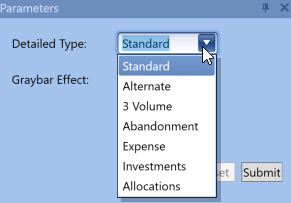
The Detailed Report lays out yearly details about gross and net reserves, revenue, taxes, investments, costs, as well as cash flows. It is very similar to the Standard Eco Report in that is shows the PW profile and economic indicators. However, it is a more detailed report with more product columns. The detailed report has many different types or layouts available for use depending on the need. To select which detailed report type to print, click on the drop-down menu in the Parameters window to the left of the report.

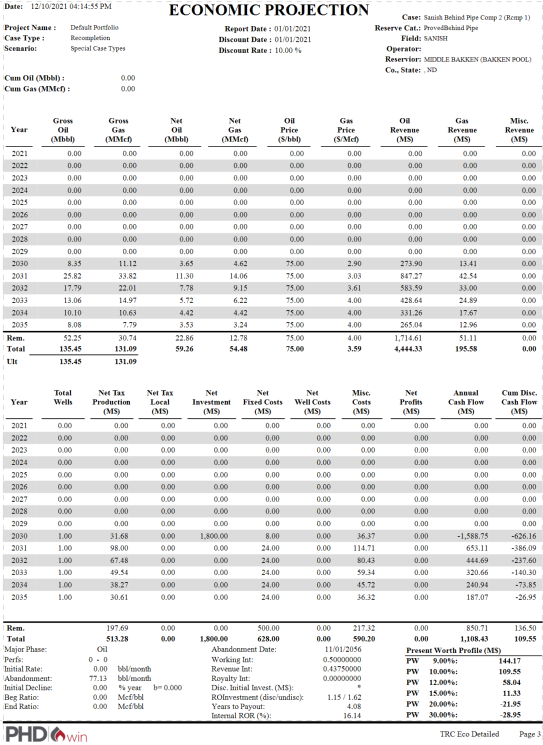
Below is an example of a standard detailed report.
The Detailed Report Types are •Standard: This Report type is used to display several different values such as gross and Net Reserves for Oil and Gas, Revenue Streams, Taxes, Investments, Costs, and Cash Flows. It also includes the Present Worth Profile and Economic Indicators. It is very organized and concise. •Alternate: The Alternate report is an expanded version of the standard type. It divides the columns into different sections and has additional product columns. The column categories are Estimated 8/8ths Production, Net Production, Company Future Gross Revenue, Production and Ad Valorem Taxes, Deductions, and Future Net Income before tax. The Alternate Report type still displays the Present Worth profile and economic indicators. •3 Volume: The 3 Volume report allows users to select any three products to display on the report, instead of just being limited to oil and gas as in the standard report type. The report calculates the Gross and Net Volumes and Revenues for the selected products. The options are Oil, Gas, Natural Gas Liquid (NGL), Condensate, and Water. The 3 Volume Report also prints Taxes, Investments, and Cash Flows. •Abandonment: The Abandonment report adds a one time Abandonment Cost for the year the case stops producing. The Net Abandonment Cost is associated with the year after the Abandonment Date (shown below the chart). Oftentimes, the Abandonment Date is so far into the future that the table does not display the year the Cost should be paid. •Expense: The Expense report expands on costs to show a more indepth look at expenses. It breaks up the "other costs" into two categories: Transportation and Operational Costs. It also combines the Net Tax Production and Ad Valorem Tax into one category called Taxes. The Expense report type allows selection of two products to display Production, Prices, and Revenue. •Investments: The Investments report type expands on Investment and allows selection of two different products and four Investment categories to display. It also shows Revenue, Taxes, Costs, and Cash Flows. •Allocations: The allocations report type breaks down the working interest based expenses, investments, and abandonment costs into allocated and unallocated components. This is useful when an allocation GEL group case is part of the report run and you want to distinguish between group costs and individual costs on the cases. Since the Detailed report is only printed on a single page, there is often not enough lines to fit all the projection years until the abandonment date. Therefore, the remaining values are summed up and printed in a row labeled Rem. and combined with the other yearly values to calculate the Total row. |