Navigation: Database Settings > Products & Phase Configuration > Default Phase Configurations >


The Waterflood Product Configuration is set up so that the Major Phase product is Oil. Liquids per Well, Total Wells, and WOR (Water Oil Ratio) are projected. Then Total Fluids, Oil, and Water are calculated using the projections for the other three products. For Waterflood, both water and oil will be pumped out of the well, and the amount of oil is more accurately projected using WOR versus cumulative oil produced, as opposed to other projection methods which use a rate/time projection.
 What Are the Default Products in the Waterflood Configuration?
Projected Products Most of the products, Fluids per Well, Total Wells, and Days, will be scheduled into the future as a rate/time projection. The projections can be forecasted on the graph using Arps, SEDM, other types of decline curves, or the future monthly volumes can be directly inputted as a scheduled projection. However, the WOR projection in this phase configuration is scheduled using a rate/cum projection. All Projected products: •Fluids per Well - Must be scheduled in order to calculate Oil. •Total Wells - Must be scheduled in order to calculate Oil. •WOR - Must be scheduled in order to calculate Oil. The rate for the WOR projection can be inputted as a flat ratio or may change as the cumulative volume for another product increases. The best way to input a flat ratio is by using a flat projection segment. It is important that the initial Cum (Cumi) for the WOR projection is set to 0 if there is no historical data for Oil. An error occurs if this is not the case. •Days - Not required, PHDwin normalized days in the month to plot values if no projection is entered for days.
Calculated Products Once the projections for Fluids per Well, Total Wells, and WOR are set up, Total Fluids, Oil, and Water volumes are calculated based on those values using formulas. These products have default formulas for the calculation (these can be adjusted). The historical data for these products is still set up to be inputted or scheduled in the Monthly History form. All calculated products and their formula definitions: •Total_Fluids = Total Wells * Fluids per Well •Oil (Major Phase) = Total_Fluids / (WOR + 1.0) •Water = Total_Fluids - Oil |
How Do I Create a Single Waterflood Case?
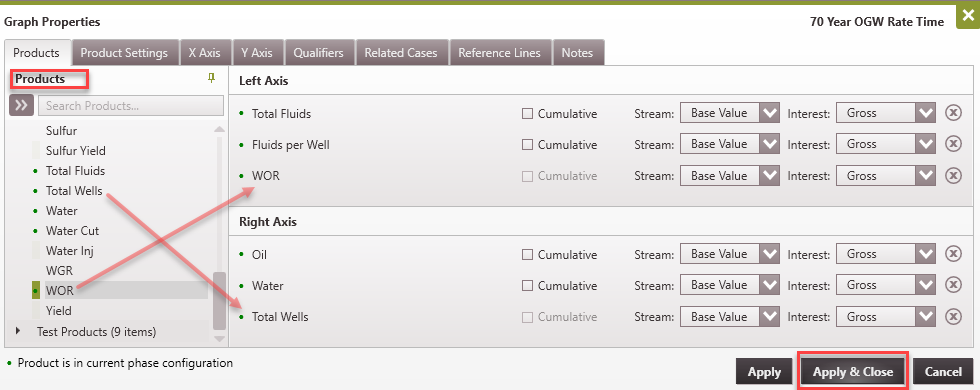
1.Create a new case if it is not already built. 2.Go to the Projection Ribbon and change the Phase Configuration to Waterflood. 3.Go to the Graph to input the projections. If there isn't a graph open, go to the Graphs flyout and double-click on the name of a graph to display it in the view. 4.On the Graphs, double-click on the empty graph to add products. Double-click on a product in the Products pane on the left to add it to the graph. A maximum of six products can be displayed at the same time on the graph. Drag and drop the products from the available list on the left onto the section on the right. Make sure to display at least Fluids per Well, Total Wells, and WOR - these are the products to project. Also display Oil, Water, and Total Fluids to view the resulting values as the projections are updated for the other products. 5.Go to the Projection ribbon and create forecasts for Fluids per Well, Total Wells, and WOR. Oil, Water, and Total Fluids will be calculated from these values per the formulas above.
|
How Do I Create a Waterflood Unit Case from a Group of Wells?
To create a waterflood unit case, see the Waterflood Unit section of group cases. |