Navigation: Special Case Types > Group Cases >


Non-GEL Unit cases are a type of group case used to gather the gross economic volumes from a group of wells. It is similar to a Group Economic Limit (GEL) Unit but:
•it does not solve for a GEL. It calculates its own economic limit based on the economic inputs applied to it.
•it does not limit the ability of child cases to be included in another group case.
•it does not change the reporting options of child cases.
When creating a group case in PHDwin, select the cases that make up the group, or the Child Cases. Each individual case can have unique ownership, commodity prices, expenses, or investments. PHDwin gathers the historical and projected volumes from the child cases, up to their individual economic limits to the group.
 Applications of a Non-GEL Unit
1.Saltwater disposal (SWD) well where the operator owns the SWD well for their assets. If the operator is also handling water disposal for other companies, i.and you have those individual wells in your database, use a projection unit or an aggregate unit to gather those volumes and apply associated economic inputs. ii.if you don't have the individual wells, you can create a standard case, project the water volumes to be handled with associated economic inputs. iii.You want to run the cases in i and/or ii above as standalone cases since you do not have ownership of the entities. You are only receiving revenue for handling the water. Exclude the volumes from reporting as well. iv.if there is skim oil to be recovered from the water, you can set up the appropriate formula to calculate its volume. If you wish to get revenue from this, consider applying appropriate economic inputs to generate the revenue. 2.Gas Plant/Midstream Case. Conditions in 1(i - iv also apply). 3.LNG Plant 4.Income Tax 5.Group Reversion |
Setting Up a Non-GEL Unit Case
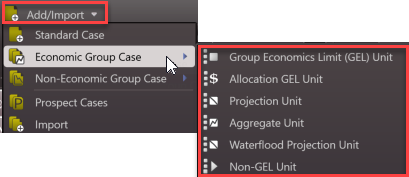
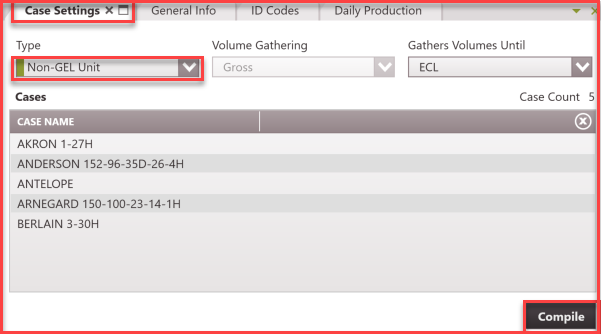
To create a new Non-GEL Unit case: 1.Go to the Home Ribbon and click the Add/Import button in the top left corner and under Economic Group Cases and select Non-GEL Unit. If needed, rename it in the General Info tab to something that relates to the child cases used for grouping. 2.Go to the Forms list and double-click on Case Settings if it's not already in the view. 3.For Volume Gathering, the only option available is Gross because this group case does not take into account net volumes for plotting. 4.For Gather Volumes Until, Economic Limit (ECL) is the only option available because that is the function of this group case. 5.Save changes and click Compile. 6.Apply prices, expenses, or investments as needed to the Non-GEL Unit cases using the appropriate forms.
|
To Edit the Cases in the Non-GEL Unit
1.Find the Non-GEL case on the case list and double-click to make it active. 2.Go to the Forms list and double-click on Case Settings if it's not already in the view. 3.Update the case selection if new wells are being added or dropped from the unit. 4.Update the case by clicking Compile. |
Example - Model a SWD Well using a Non-GEL Unit
A company owns a midstream entity that operates 100% of a saltwater disposal well. The cost of disposal to the parent company is $3.00/bbl to dispose water from its 5-well lease. It cost $500/month to operate this SWD well. To model this using a Non-GEL Unit, set up for this midstream company would be:
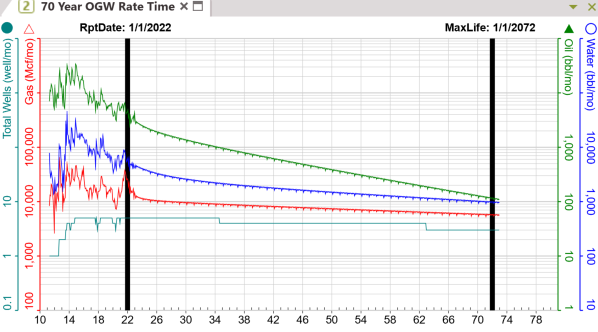
•Create a Non-GEL Unit case using the 5 wells following the steps outlined above. You can exclude the other products from the graph or set up an appropriate phase configuration. •Apply a $3.00/bbl water price and a fixed cost of $500/month to the case. •Run a report for the case.
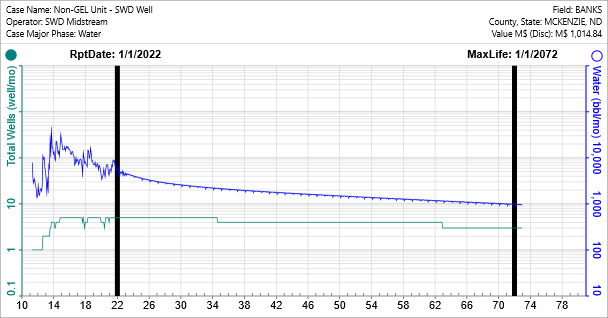
The graph below shows the NPV10 for an effective date of 1/1/2022. The case was set up to exclude volumes from report since the midstream entity does not own the water. With this set up, if the parent and midstream companies generate a single cashflow for reporting, there is no double-dipping on water volume.
|