Navigation: Special Case Types > Group Cases >


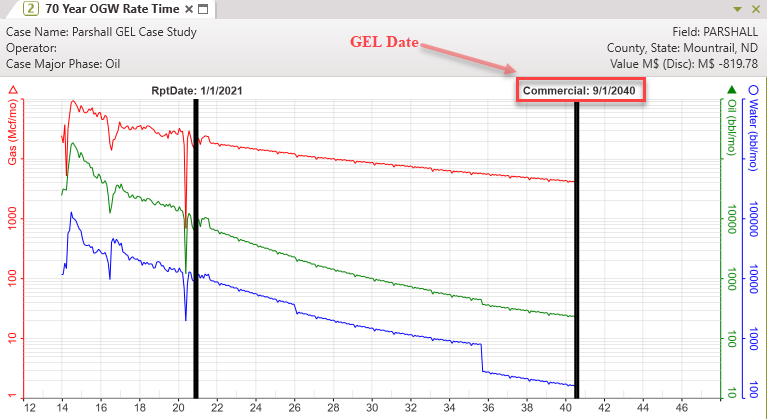
GEL Unit cases are a type of group case used to calculate the maximum life of a project where there are shared expenses or revenues between a group of wells. The group costs are any expenses associated with operating the entire group of cases, but are not tied to any specific lease or well. They can be recurring expenses, one time expenses, or investments. GEL Unit cases use the group economics to solve for the Group Economic Limit (GEL), or the date at which the child cases can no longer support the expense at the group level.
When creating a group case in PHDwin, select the cases that make up the group, or the Child Cases. Each case can only be associated with one GEL group. Each individual case can have unique ownership, commodity prices, expenses, or investments. PHDwin weighs the profit of the individual cases and any group revenue against the group case expenses to find the maximum cumulative cash flow. The date at which the group of cases reaches the max cum cash flow is the GEL Date. If changes are made to any of the child cases that affect the economics, the GEL case needs to be recompiled to determine the new GEL Date.
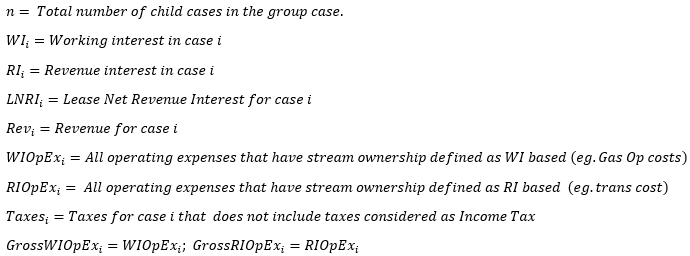
Once the GEL unit case has been created and all the child cases have been added, the ownership of the group case also needs to be specified. The ownership values can either be entered manually, if they are known, or a blended ownership of the child cases can be used. The blended ownership values are calculated using the equations below. •Working Interest - calculated by multiplying the revenue by Working interest for each case minus operating expenses times Working interest, summing those values for all the cases and dividing by the Lease NRI.
•Revenue Interest - calculated by multiplying the revenue by Revenue Interest for each case minus operating expenses times Revenue Interest, summing those values for all the cases and dividing by the 8/8 Royalty Interest. Where: An classic example of a GEL Unit case is when several wells are connected to a production facility. There are certain expenses associated with operating the facility itself that is not tie to any individual well. These expenses must be paid whether the facility connects to one well or ten wells. Each well also have its own costs. When any one well is shut off, its expenses also stops. However, the expense to operate the facility continues until the entire operation or group of wells is shut down. A GEL Unit case calculates the date at which this group reaches the max cum cash flow, after which the operation is no longer profitable. For a GEL unit case, all costs are reported at the group level. This means that the expenses are not allocated to each child case, but are treated as combined expenses, and will report as a group. To model a case in which the expenses are split up amongst the child cases for reporting, set up the case as an Allocation Unit. |


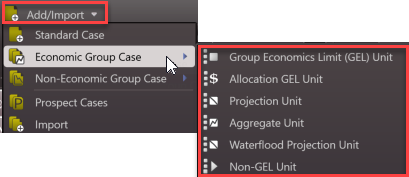
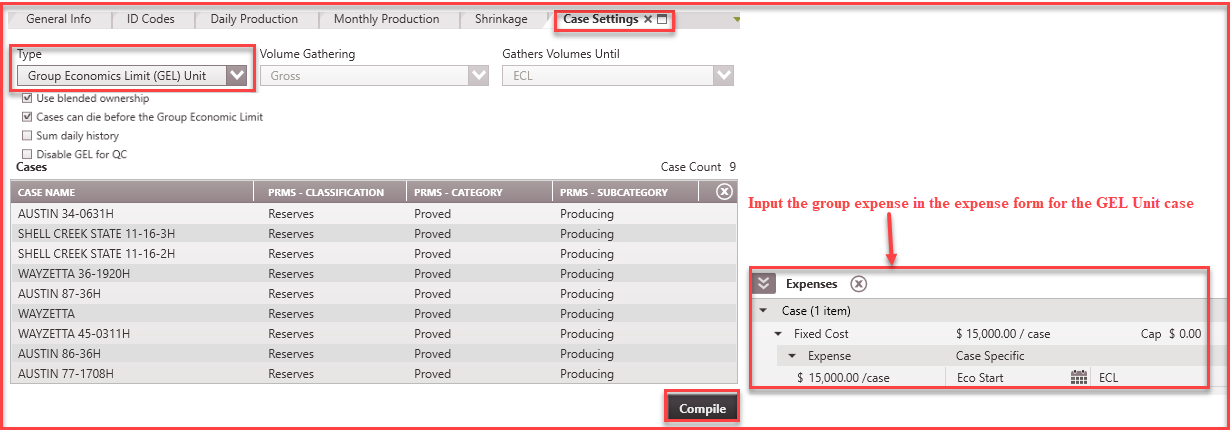
To create a new GEL Unit case: 1.Go to the Home Ribbon and click the Add/Import button in the top left corner and under Economic Group Cases and select Group Economic Limit (GEL) Unit. If needed, rename it in the General Info tab to something that relates to the child cases used for grouping. 2.Go to the Forms list and double-click on Case Settings if it's not already in the view. 3.For Volume Gathering, the only option available is Gross because this group case does not take into account net volumes for plotting. 4.For Gather Volumes Until, Economic Limit (ECL) is the only option available because that is the function of this group case. 5.Check the Use Blended Ownership box to use automatically calculated ownership values based on the ownership values of child cases. The equations used are shown above. 6.Check the Cases can die before the Group Economic Limit to indicate whether or not the child cases are allowed to end before the group case goes uneconomic. If the box is checked, any case whose ECL occurs before the GEL date will be truncated at their ECL date. If this box is unchecked, all child cases will run until the GEL date, but some cases will report negative values. 7.Sum daily history - If selected, this option aggregates the daily production data from the child cases. Daily history records are to be summed over the entire daily history of each child case without regard for the Gather Volume Until setting on the group. 8.Check the Disable GEL for QC box to allow all child cases to run until their individual EUR's. This option is for users who would like to solve for their own GEL Date and verify it in the cash flow. 9.Add the Child Cases by dragging them from the case list on to the bottom part of the Case Settings form. 10.Apply any group expenses or investments to the GEL Unit cases using the expense or investment form. 11.Save changes and click Compile.
|
 To Edit the Cases in the GEL Unit
1.Find the GEL case on the case list and double-click to make it active. 2.Go to the Forms list and double-click on Case Settings if it's not already in the view. 3.Adjust any settings and/or check and uncheck boxes, including the case selection. 4.Update the case by clicking Compile. |
All group expenses will all be reported on the Group Case. Running a GEL case by itself results in negative cash flow. The practice is to run a report of the GEL Unit case along with its child cases. Running this report generates report for each child case, the GEL Unit case, and a Grand Total which is a summary of all the cases in the report. The grand total page shows the report for the group. Effective interests using user defined values or the blended ownership values calculated are used to net down the expenses correctly for reports. The case is also set up so that by default, the volumes are reported on the individual group case, but not added into the summary page report. All child cases report their share of cash flows normally. |
The GEL calculation is a multi-step process. First, PHDwin finds the economic limit for each child case (without considering the group costs). Then, it aggregates to the group level, and weigh the group costs against the profit of the individual cases. The case's GEL will be the date at which the group reaches the maximum cumulative cash flow. The addition of the group costs may shorten the life of one or more child cases in the group. The Group Economic Limit is calculated by the maximum cumulative value of the equation: GEL Date = Profits + Group Revenue - (Operating Expenses + Taxes) |

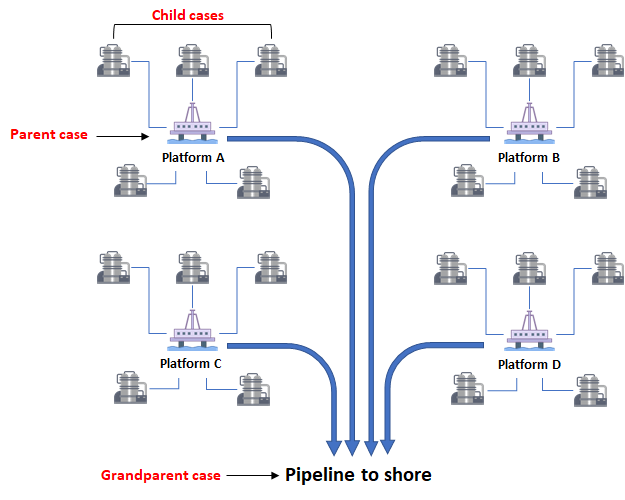
Nested GELs are group cases that consist of other GEL Units. Nested GELs are useful because they can help with grouping of expenses when it is necessary to separate the expenses out. Nested GELs can be as many layers of GEL cases as needed. They will consist of child cases, parent cases, grandparent cases, and so on. While each child case has its own economic limit, they might be shortened by its parent GEL, and those parent GELs might be shortened by the grandparent GEL. You can create as many Nest GEL layers as necessary for your project. To create a Nested GEL: 1.Create a new GEL Unit case and add the child cases from the case list. 2.Repeat Step 1 for as many parent cases as needed. 3.Create a new GEL Unit case to be designated as the Grandparent case. Add all the previously created parent GEL Unit cases to the grandparent case. If needed, sort or filter the case list to only show the GEL Units already created. 4.Repeat Steps 1-3 for as many grandparent GEL Unit cases as desired to add to a great-grandparent case if necessary. The simplest example of when to could use a Nested GEL case would be several platforms in an offshore block. If all the platforms in a certain block are connected to a pipeline that must be operated by each platform, it may be necessary to create a nested GEL system. Each offset well in the platform would represent a child case, each platform would be a parent case, and the pipeline would be the grandparent case. Therefore, the calculated Group Economic Limit for the Nested GEL Unit would be the date at which the platforms can no longer support the expense of operating the pipeline. The following diagram shows what a nested GEL system could look like:
|