Navigation: Special Case Types > Group Cases >


Allocation GEL Unit cases are used to calculate a Group Economic Limit (GEL) for a set of selected cases. The calculation of the GEL is necessary because of shared group costs. The group costs are any expenses associated with operating the entire group of cases, but are not tied to any specific case. They can be recurring expenses, one time expenses, or investments. An Allocation Unit is different from a GEL unit because group costs are allocated back to the individual cases based on profits for reporting.
When creating an Allocation Unit in PHDwin, select the cases that make up the group, or the Child Cases. Each case can only be associated with one Allocation Unit group. Each individual case will have unique ownership, commodity prices, expenses, or investments. PHDwin weighs the profit of the individual cases and any group revenue against the group case expenses to find the Maximum Cumulative Cash Flow. The date at which the group of cases reaches the Maximum Cumulative Cash Flow is the GEL Date. If changes are made to any of the child cases that affect the economics, the case needs to be recompiled to determine the new GEL Date.
An example of an Allocation Unit is a waterflood case. If there are several wells on a single unit and they are all being waterflooded by the same injector well, the wells share the group expense of operating the injector. In addition to the shared cost of operating the injector, the individual wells have their own expenses as well. When any well is shut off, its individual expenses also stops. However, the expense to operate the platform continues until the entire operation, or group of wells, is shut down. The group's expenses is allocated to the individual wells proportionally to the amount of profit each well realizes. The Allocation Unit then calculate the Group Economic Limit date, which is the date of Maximum Cumulative Cash Flow, and beyond which the operation longer becomes profitable.
When using an Allocation Unit, the expenses for the group are not reported at the group level, they are distributed amongst, or allocated to, the Child Cases based on the chosen Allocation Method.
 Setting Up an Allocation Unit Case
To create a new Allocation Unit case: 1.Go to the Home Ribbon and click the Add/Import button in the top left corner and under Economic Group Cases and select Allocation GEL Unit. If needed, rename it in the General Info tab to something that relates to the child cases used for grouping. 2.Go to the Forms list and double-click on Case Settings if it's not already in the view. 3.For Volume Gathering, the only option available is Gross because this group case does not take into account net volumes for plotting. 4.For Gather Volumes Until, Economic Limit (ECL) is the only option available because that is the function of this group case. 5.Check the Cases can die before the Group Economic Limit to indicate whether or not the child cases are allowed to end before the group case goes uneconomic. If the box is checked, any case whose ECL occurs before the GEL date will be truncated at their ECL date. If this box is unchecked, all child cases will run until the GEL date, but some cases will report negative values. 6.Sum daily history - If selected, this option aggregates the daily production data from the child cases. Daily history records are to be summed over the entire daily history of each child case without regard for the Gather Volume Until setting on the group. 7.Check the Disable GEL for QC box to allow all child cases to run until their individual EUR's. This option is for users who would like to solve for their own GEL Date and verify it in the cash flow. 8.Add the Child Cases by dragging them from the case list on to the bottom part of the Case Settings form. 9.Apply any group expenses or investments to the Allocation Unit case using the expense or investment form. 10.Save changes and click Compile.
Note: Blended ownership is automatically enabled for an Allocation GEL Unit.
|
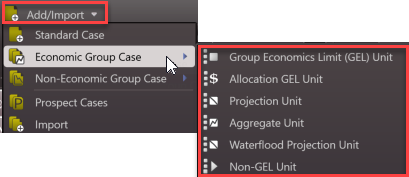
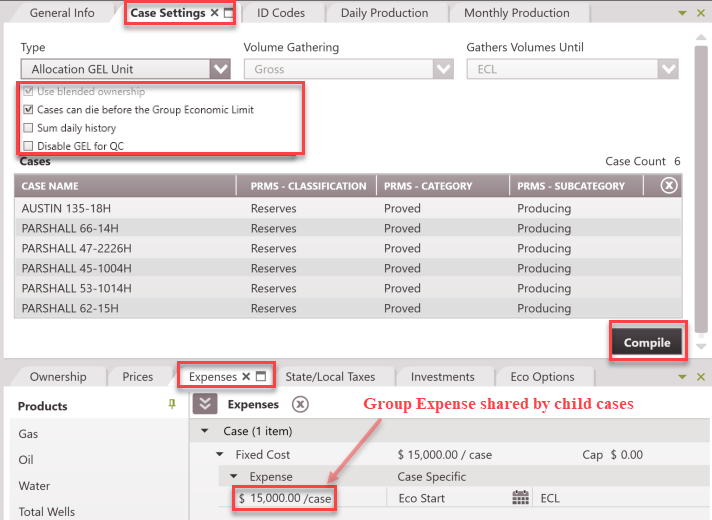
To Edit the Cases in the Allocation Unit
1.Find the Allocation case on the case list and double-click to make it active. 2.Go to the Forms list and double-click on Case Settings if it's not already in the view. 3.Adjust any settings, including the case selection. 4.Update the case by clicking Compile. |
How Group Costs are Allocated and Reported
Group costs are allocated to the Child Cases for reporting based on Gross Operating Income. Hence, the Child Case reports its normal cash flow (including its own revenue and expenses), and also reports its share of the group costs. The Group Case is excluded from reporting completely. Gross Operating Income = (Gross Revenue x LNRI) - Gross WI Expenses (Gross RI Expenses + Gross Taxes) x LNRI Monthly recurring expenses are allocated based on each case's monthly operating income. Only cases with a positive monthly operating income in the current month are allocated expenses. If there are no positive cases in any given month, remaining gross profit is used as a backup method. One-time investments are allocated based on Total Life Profit (or the entire gross profit for the life of the case). So cases that are more profitable carry larger portions of the investment. Gross Profit is used to allocate expenses because it is the best way to report a portion of the group costs on all of the positive cases. It ensures that one case doesn't receive too big of a portion of the costs and look negative for reporting. If expenses were allocated based on something simple, like well count, an individual case's report could appear negative even though the entire group is still positive. Sample Allocation Calculation Here is a sample of how allocations are calculated. In this example, assume that a GEL is created to allocate monthly fixed expenses. There are three child cases in the GEL. The fixed cost on the GEL is $5,000 per month. This group expense needs to be allocated to those three cases. To calculate how to allocate this monthly expense, first determine the gross operating income for each child case for a given month. For example, assume the following numbers represent the gross operating income in January for each case: •Case 1 = $25,000 •Case 2 = $75,000 •Case 3 = -$1,000,000 (The third case is negative this month due to a shut-in period of no production).
To calculate the portion of the expense that is allocated to each case: 1.Add up the total gross profit for the month. Only cases with positive profit are included. For this example, Total Gross Profit = $100,000. 2.Calculate the allocation factor for each case. The allocation factor is each case's profit divided by the total profit. a.Case 1 = $25,000/$100,000 = 0.25 b.Case 2 = $75,000/$100,000 = 0.75 c.Case 3 = 0. Since this case's gross profit is negative, no portion of the expense will be allocated here this month 3.Multiply the expense by the allocation factor for each case. This is the portion of the expense allocated to each case. a.Case 1 = $5,000 * 0.25 = $1,250 b.Case 2 = $5,000 * 0.75 = $3,750 c.Case 3 = $5,000 * 0 = $0 4.Use the case's working interest to net down the expense for reporting. |