Navigation: Database Settings >


A Stream is a set of values calculated over time as a function of a Product or other Stream. For example, Streams can be Cash Flows (Op Costs, Trans Costs, Product Revenue) or Volumes (Shrunk Gas). Only certain Product types can be used to generate Streams. Test products, Ratio Products, and Cash Formulas cannot create Streams. All other products can. A Stream is calculated as a function of its input Stream or Product by applying a Deck. Ownership Interests are applied automatically to every stream to produce Ownership Adjusted Stream values over time.
PHDwin has several default Streams set up to model and report things like Production, Revenue, Expenses, and Taxes. In general, the default Streams should not be modified. If you do want to change something, such as having Op Costs calculated from Shrunk Volumes, you could modify that here by changing the Input Stream for Op Costs. You could also add new Streams to model something, such as an Expense that you need to report separately from the default Expense Streams.
 Where Can I See the Available Streams?
Go to the Database Settings Ribbon and click on Streams and then Edit to enter Edit Mode.
Note: All changes to the Streams Editor are automatically saved upon closing the window. |
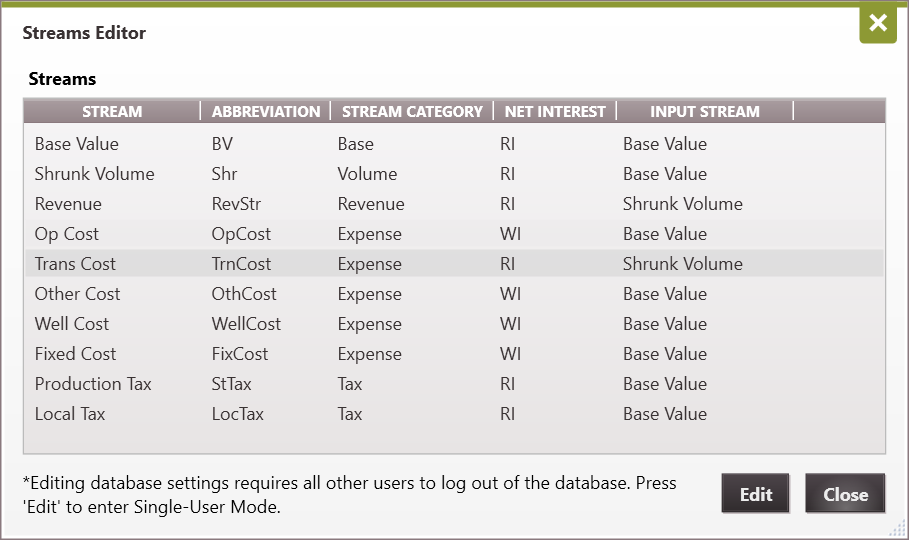
 What Are the Default Streams and How Are They Calculated?
Default Streams •Base Value - The base value is going to be the gross production values for each product - from monthly history and projected data. For well count (which is technically a product), it will be the number of wells. The base value is always required to calculate the next stream. •Shrunk Volume - The Shrunk Volume is calculated from the base value after the shrinkage factors have been applied. •Revenue - The Revenue streams for each product are calculated by applying the price decks to the Shrunk Volume. Price decks are the base price, price escalation, price differentials, and the energy factor (for gas products). The Net Revenue is found by applying the Revenue Interest. •Op Cost - The Operating Cost streams for each product are calculated by applying the op cost decks to the base value stream. Op costs decks are the base op costs, op cost differentials, and op cost escalation. The Net Op Cost can be found by applying the Working Interest. •Other Cost - The other cost streams for each product are calculated by applying the other cost decks to the base value stream. Other cost decks are the base other cost, other cost differentials, and other cost escalation. The net other cost can be found by applying the Working Interest. •Trans Cost - The transportation cost streams for each product are calculated by applying the trans cost decks to the shrunk volume stream. The trans cost decks are trans cost, trans cost differentials, and trans cost escalation decks. The net other cost can be found by applying the Revenue Interest. •Fixed Cost - The Fixed Cost streams for each product are calculated by applying the Fixed Cost decks to the base values for the case product (the case product is always equal to a value of 1). The Fixed Cost decks are Fixed Cost, Fixed Cost differentials, and Fixed Cost escalation. The Net Fixed Cost can be found by applying the Working Interest. •Well Cost -The fixed cost streams for each product are calculated by applying the well cost decks to the base values for the well product (can be more than 1 if the user assigns another value to it). Well cost decks are the base well cost, well cost differentials, and well cost escalation decks. The net well cost can be found by applying the Working Interest. •Production Tax - The state production tax is calculated in cash formulas. •Local Tax - The local county tax for US properties. Net Interests Each stream has a net interest associated with it. If you are reporting the net value for the stream, it will be calculated as net to this interest: •WI - The Working Interest specified on the case. •RI - The Revenue interest specified on the case (royalty interest is added when revenue interest is chosen). Sample Stream Calculations Users can create and apply price, expense, and shrinkage decks to the volume streams in order to generate other streams. All of these are considered decks in PHDwin: •Shrinkage decks are applied to base value stream to calculate the Shrunk Volume Stream. •Price, Price escalation, Price differential, and Energy factor decks are applied to shrunk volume to generate the revenue stream. •Expense, Expense escalation, and Expense differential are applied to the base value or shrunk volume streams to generate expense streams.
Example 1 - Calculating the Shrunk Volume Stream Stream x Deck = New Stream Base Value X Shrinkage Deck = Shrunk Volume Gas Production in Mcf X Shrinkage Rate(%) = Shrunk Volume (Mcf)
The Revenue Interest is applied to the Gross Shrunk Volumes in order to calculate the Net Shrunk Volume.
Example 2 - Calculating the Revenue Stream Stream x Deck = New Stream Shrunk Volume X Price = Revenue Shrunk Gas Production in Mcf X Gas Price ($/Mcf) = Gross Revenue ($)
Sometimes a combination of decks is applied to one stream to generate another. In the example above, the price is a deck. Adjustments to the price are considered decks as well, including escalations, differentials, and energy factors. A Deck can be applied via a model or a case specific value. The Revenue Interest is applied to the Gross Revenue in order to calculate Net Revenue.
Example 3 - Calculating the Well Cost Stream Stream x Deck = New Stream Base Value X Well Expense = Well Cost Well Count X Well Cost ($/Well) = Gross Well Cost ($)
The Working Interest is applied to the Gross Well Cost in order to calculate Net Well Cost. |
To Add a New Stream New Revenue or Expense Streams can be added if necessary. The new Streams will be displayed on the standard Prices or Expenses Forms. To add a new stream (only possible in Edit Mode): 1.Click on the 2.Fill out the following information. Use the previous information about the default streams and samples to get a better understanding of how they work: •Stream Name -Enter the name for the stream how you want it to appear throughout the program. For example, if a user adds a new stream called LOE, and set it to be an Expense stream, it would show up on the Expenses form as LOE. •Abbreviation - Enter the abbreviation used for reporting. •Stream Category - Select from Base, Volume, Revenue, Expense or Tax. •Net Interest - Select which interest should be used to report net values for this stream. The options are: oWI - The Working Interest specified on the case. oRI - The Revenue interest specified on the case(plus any royalty interest if one is specified). •Input Stream - Select which stream this new stream should be based on. If you'd want your op costs based on the base value instead of shrunk volume, make that adjustment here. 3.Click Close to save the changes.
To Input Values for New Price and Expense Streams 1.Go to the prices or expenses form. 2.Click on the 3.Enter the price or expense as usual.
To Input Values for New Tax Streams Entering values for new tax streams is slightly different from prices or expenses - it is recommended to contact the consulting team at TRC Consultants, LC for help with this. Since all taxes are created with cash formulas, you must write a cash formula for the new tax. The basic steps are to add a new model and then add a formula. The formulas definition should represent how the tax is calculated. On top of the formula editor, there is a section that says Report As and there is a drop-down menu to select the stream. Select the name of the tax stream created here. Whatever is calculated will be an additional deduction when determining the economic limit of the case. |
