Navigation: Navigating the Program & Interface >


The status bar at the bottom of PHDwin displays useful information that helps users evaluate and keep track of cases. The status bar is not only used to label which scenario and case that is active, but also used to display the economics and ownership of the active case. By default, the field spacing auto-sizes to fit the information, but the size of each field can be modified manually to control the spacing between each information field. To do this manually, right-click on the status bar and uncheck auto-size.
Here is what a typical status bar looks like for a given case:

 How Do I Choose Which Fields are Displayed?
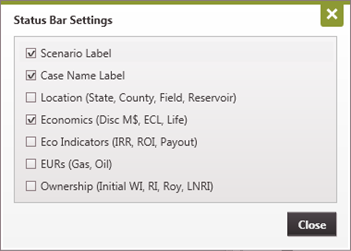
To customize the left section of the status bar, right-click on the status bar and choose Settings.
The Scenario and Case Name are always displayed. However, users can turn on or off the Scenario Label or Case Name Label to save space. This deletes the "Scenario:" and "Case Name:" titles in the status bar. The other parameters that can be viewed on the status bar are: •Location - o State, County, Field & Reservoir •Economics - oDiscounted Present Value in M$ oEconomic Limit Date or GEL Date for Group Cases with a link to compile oThe Remaining Life of the case - in years from Report Date to ECL •Economic Indicators - oIROR - Internal Rate of Return oROI - Return on Investment (undiscounted) oPayout - in Years •EURs - oFor Oil & Gas •Ownership Interests - oInitial Working Interest oRevenue Interest oRoyalty Interest oLease NRI
The economics,economic indicators, and estimated ultimate recovery (EUR) values change based on changes in the projection for each graph and product (oil, gas water). The ownership interests can be modified for each case through the ownership form. |
By default, the status bar automatically sizes each field according to it's character length. So, if the length of case names changes, the fields moving around. If you prefer each field to be in the same location when navigating between cases, right-click on the status bar and turn off or uncheck Autosize. Then each field should have a divider that can be used to manually resize each field.
|
