Navigation: Database Settings >


The Default Graph Manager is designed for users to specify which graphs are available instance-wide or only within the current database. It allows users to define their default graphs for new cases as well as view and manage those defaults. It also allows users to "copy" a graph model from one database to another using the Instance Wide list as an intermediary. You do not need to enter Edit Mode to apply changes to the default graph manager.
The following concepts are referred to in this section:
•Instance Wide/Level - data that is stored outside of the user created databases, and is stored in PhdDefaults. This data is available to all databases within the instance.
•Database Wide/Specific - data that is stored within each user created database. This data is only seen when that specific database is open and would be included in the PHZ3 transfer files like all other data in the database
•Graph Template - the set of graph properties that are stored in a graph model. These are not dynamically linked to the model and are only stored or applied as a one time edit.
•Linked Graph Properties - are the result of applying a model to a graph. When the model is updated, the graphs that have the model applied update automatically as well as a result of these Linked Graph Properties.
•Inherited Graph Properties - are the result of applying the model properties to a graph as a template, but are not dynamic. If the model is updated, it does not impact graphs that have Inherited Graph Properties from the model previously.
The default graph manager consists of two panels as shown below.
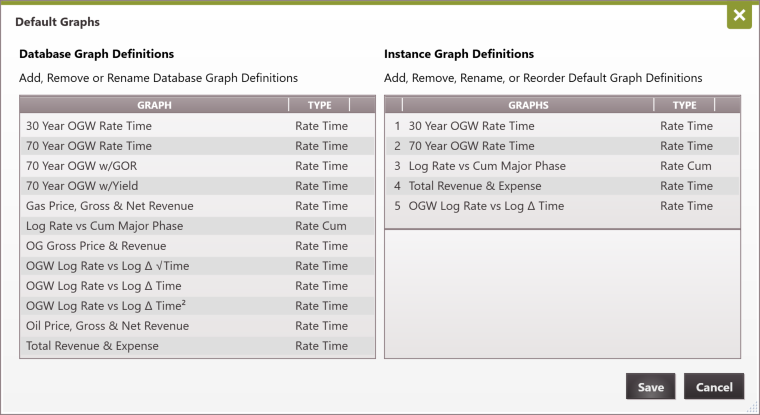
1.A list of Database Specific graph models is displayed on the left panel.
a.This list contains all graph models currently available within the database listed alphabetically, similar to the display in the current Manage Graph Models dialog box.
b.The graph type "Rate Time" or "Rate Cum" is displayed to the right of the graph model name.
c.This list potentially (and most often) changes when a user logs into a different database, depending on what models have been added to the database.
2.A list of Instance Wide graph templates is displayed on the right panel.
a.The top part of the panel shows PHDwin Default Graphs.
i.Originally, when creating the first Phd database on a brand new SQL instance, this list contains only the 5 graph templates currently packaged with the product:
1.30 Year OGW Rate Time
2.70 Year OGW Rate Time
3.Log Rate vs Cum Major Phase
4.Total Revenue & Expense
5.OGW Log Rate vs Log delta Time
ii.Users can drag and drop the Default Graphs within this numbered list to change their order.
iii.Any new case created in any database within this SQL instance starts off with these default graphs available on the Graphs flyout in their respective positions. This includes cases created via import of PHDwin V2 PHZ files or any other file type.
1.Note: These are just inherited graph properties applied as a template and are not dynamically linked to a graph model.
iv.The Default Graphs list should have no impact on existing cases in a database. Changes apply to new cases only.
b.The bottom part of the panel shows additional graph templates that have been stored up to the Instance Wide level. While these are available instance-wide, they are not part of the default graphs.
i.These graph templates are listed alphabetically.
ii.Users can drag and drop a graph template from the bottom portion of the right panel list of Graph Templates up to the top portion of Default Graphs list to make them part of the default graphs available for all new cases.
1.Dropping a graph template in should insert the graph with a number based on where it's dropped and renumber positions of the Default Graphs below the drop point accordingly.
2.The same graph template name cannot appear on the Default Graphs list more than once. A number is appended at the end if the graph already exists in the list.
c.The graph type "Rate Time" or "Rate Cum" is displayed in a separate column to the right of the graph template name.
d.This list should look the same across all databases within the SQL instance.
3.Users can double click the name of a graph model or graph template under either list to rename the model/template.
a.Two graph models cannot have the same name.
b.Two graph templates cannot have the same name.
c.A graph model and graph template can have the same name.
4.An X icon appears to the right of the graph type for each graph model or graph template allowing the user to delete the model/template from its respective list. If a graph is deleted from any of the panels, it is deleted completely.
5.Users can drag a graph from the Database Specific list on the left onto the Instance Wide list on the right, or vice versa.
a.This will create a new target graph with the inherited graph properties and graph name from the selected source graph.
b.If the user drops the source graph in between two existing graphs on the target list, the new graph is added to the list and sorted alphabetically.
i.If the placement is between two default graphs, then the new graph will be inserted with a number based on where it's dropped and renumber positions of the Default Graphs below the drop point accordingly.
c.If the user drops the source graph on the same line as an existing graph in the target list, this will give the user a prompt to overwrite the existing graph.
d.With either placement, if another graph of the same name already exists on the target list, the program will automatically append a number to the end of the new target graph name to keep the name unique.
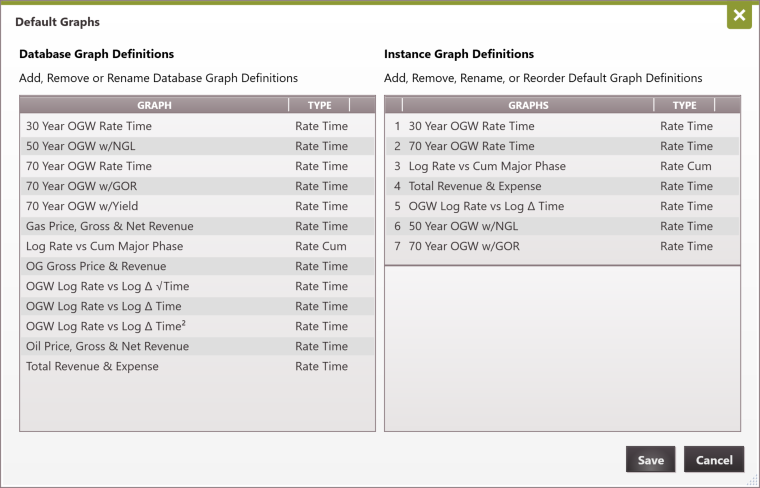
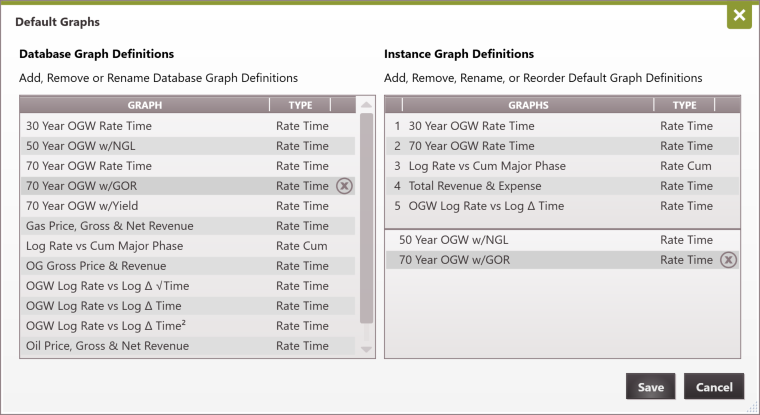
A new rate-time graph model "50 Year OGW w/NGL" was created in the current database and has been added to become available instance-wide as shown below. This model can be moved up to become part of the default graph templates. It can also be moved to another database from this location
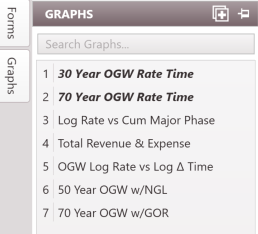
The new model, along with the 70 Year OGW w/GOR graph template, has now been added to the list of default graphs as shown below. New cases added to the database/instance would have 7 default graph slots in the graph flyout, rather than the original 5.