Navigation: Database Settings >


The Database Manager allows users to create backups of databases, restore databases, and/or delete them within PHDwin.
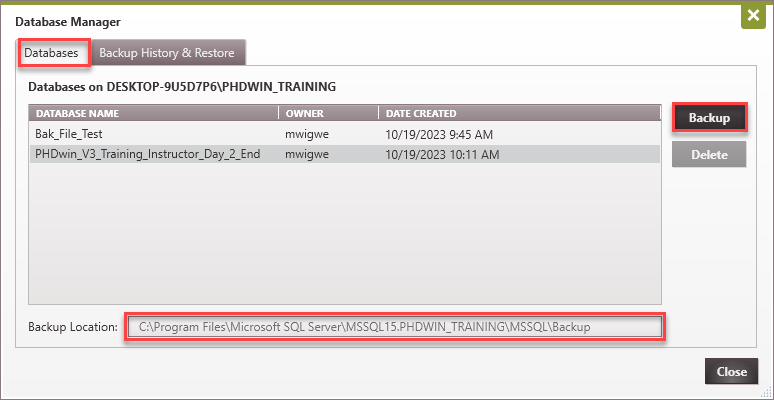
The Database Manager tab displays the databases that exist in the SQL Server instance you are connected to. In this tab, the options are to create a backup of or delete a database from the SQL Server instance. The backup location for the instance is also displayed at the bottom.
|
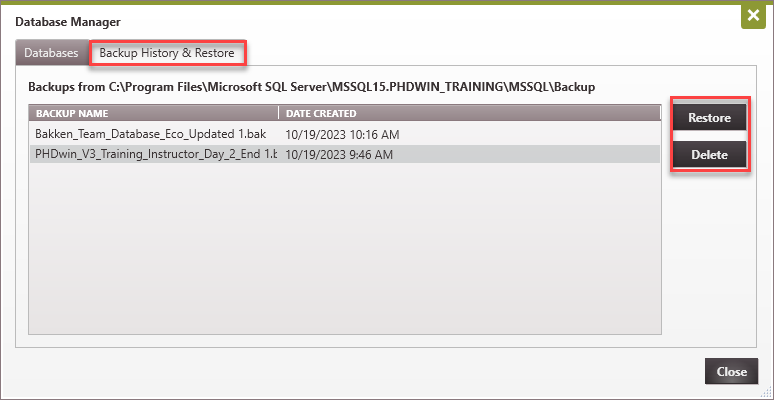
The backup history & restore tab in the Database Manager displays the backups that have been created for the databases in the current SQL Server instance. In this tab, you can restore a backup or delete the backup of a database entirely. If a backup file is deleted, it is removed from the backup directory.
|
 My Database Does Not Appear in the Database List. Why?
Although this is rare, there is a chance that a database will not appear in the list of databases for your instance. The following conditions would exclude a database from the list: •If the database was set up to be single or restricted user in SQL Server Management Studio. While you could read the name there is nothing else that could be accomplished. •The database must be online. While it is unlikely that a second user is doing a restore or the database was manually taken offline or detached, it is possible. •If the recovery model is not set to simple. Our databases are created in simple model with the exception of the reports database which uses bulk model. If the user is sophisticated enough to change the Recovery Model to a full model then they probably want to do restores at a transaction level or point in time. |
Related Topics