Navigation: Special Case Types > Group Cases >


An Aggregate Unit is a type of group case that sums up all of the historical and projection data of the child cases and runs the economics at the group level. This can be useful for reporting economics for a group of wells in the same field or reservoir. This adds another level to the summary plot due to the possibility to analyze a group of wells based on the projected economics and not just the historical production. This is different from a Projection Unit because the child case projections are created separately and then summed together in the group case. The projection unit creates a projection from the summed data.
All the economics, including the prices, expenses, investments & ownership, are inputted on the group case. The group case reports the economics and reserves, while all of the child cases are completely excluded from reporting.
Some examples of cases when using an aggregate unit could be appropriate:
•The Unitization of assets - the pooling of wells in a certain area to create a single operating unit. A series of wells' ownerships are merged into a common set of ownership interests. The unitization of wells is often done when common management would like to improve recovery with enhanced recovery operations, such as waterflooding.
•Production Sharing Contracts (PSC) - when oil companies create contracts with foreign countries to produce oil on their land, the modeling of assets is often required. However, sometimes only basic (or simplified) modeling is required in the PSC. This can be done by creating an Aggregate Unit Case.
 To Create a New Aggregate Unit Case
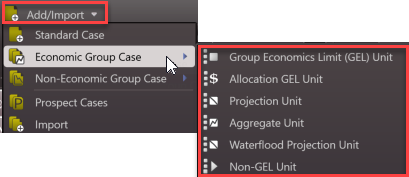
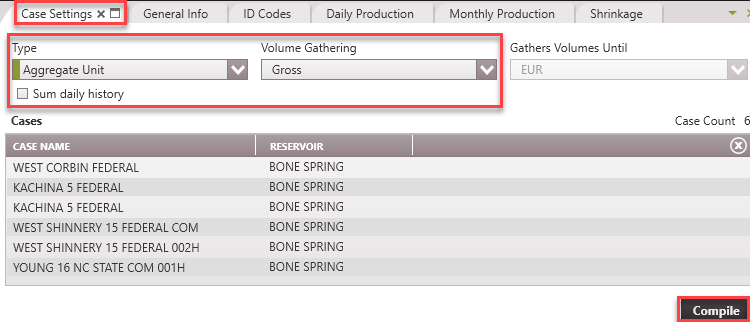
1.Make sure the each child case to be added to the Aggregate unit has a projection on it. 2.Go to the Home Ribbon and click the Add/Import button in the top left corner and under Economic Group Cases and select Aggregate Unit. If needed, rename it in the General Info tab to something that relates to the child cases used for grouping. 3.Go to the Forms list and double-click on Case Settings if it's not already in the view. 4.Adjusts the settings - •Type - Aggregate Unit •Volume Gathering - Choose whether to gather gross or net production volumes from the child cases. Net volumes will be calculated from the Revenue Interest Share of Ownership specified for the case •Gathers Volumes Until - The volumes from individual cases will be gathered until the technical EUR. •Sum daily history - If selected, this option aggregates the daily production data from the child cases. Daily history records are to be summed over the entire daily history of each child case without regard for the Gather Volume Until setting on the group. 5.Add the child cases - Open the case list and drag and drop the cases that should be part of this unit into the 'Cases' section of the Case Settings form. Use Shift + Click or Ctrl +Click to select multiple cases. If cases are grouped together by a common field using the sort order, drag the groupings from the case list into this window to grab them all. 1.Click Compile. This gathers the required volume and displays the plots on the graph. 2.From this point forward, treat the unit case as a single case: Add a projection, update any economic inputs (prices, expenses, ownership, taxes, etc) on the group case, save the changes, and run reports.
|
To Edit the Cases or Settings in the Aggregate Unit Case
1.Find the Aggregate Unit case on the case list and double-click to make it active. 2.Go to the Forms list and double-click on Case Settings if it's not already in the view. 3.Adjust any settings, including the case selection. 4.Click Compile. |