Navigation: »No topics above this level«


The following script can be used to verify that a user has, at least, the minimum permissions to run the application. The script should be executed from SQL Server Management Studio by a user that is a member of the system admin role or has been explicitly granted the Impersonate permission. If the user executing this script is not a system admin and does not have Impersonate permission the script will fail and produce invalid results.

1.Open up SQL Server Management Studio. 2.Click on New Query. 3.Copy the text from the query below and Paste it into the new window that opened in SQL. 4.There is a variable that must be changed in the script before you can run it. The variable is called @userName. Assume there is a user with a Login called Fred. The variable will then be declared like this: declare @userName sysname = 'Fred',. The Login name that you are testing must exist in the instance. 5.Choose the database that you are trying to log into and click Execute to run the script.
6.The errors will pop open in a separate window, listing the any issues with the permissions for the selected user. 7.After the script is ran on the first database it should be ran on the PhdReports, PhdUsers, PhdDefaults and PhdRules databases. The user will need permissions on each these databases and will need to be assigned to each database. The CLR checks and the Service Broker checks can be ignored on the support databases. |
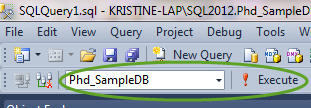
-- -------------------------------------------------------------------------------------- -- Permissions test for PHDwin version 3. -- -- The following script executes a series of tests to verify that a user has, at least, the minimum -- permissions to run the application. -- -- The script should be executed from Sql Server Management Studio by a user that is a member of the -- system admin role or has been explicitly granted Impersonate permission. -- -- If the user executing this script is not a system admin and does not have Impersonate permission the -- script will fail and produce invalid results. -- -- Instructions: -- -- Select the database to test from the drop list in management studio. The drop list is typically -- located in the upper left corner of management studio. -- -- In the first section of the script there is a local variable that must be filled in. -- -- @userName, this variable must be filled in before executing the script. -- -- Example: -- Assume there is a user with a Login called Fred. -- The variable will then be declared like this -- declare @userName sysname = 'Fred', -- -- the login name entered must must exist in the instance. -- The remaining variables do not require any modifications. -- -- Execute the script. The results will displayed in the output window of management studio. -- -- After the script is ran on the first database it should be ran on the PhdReports, PhdUsers, PhdDefaults and -- PhdRules databases. The user will need permissions on each these databases and will need to -- be assigned to each database. The CLR checks and the Service Broker checks can be ignored on the support databases. -- ---------------------------------------------------------------------------------------------------
declare @userName sysname = 'EnterUserNameHere', @clrIsEnabled int, @isSysAdmin int, @isDbCreator int, @isDbOwner int, @isBulkAdmin int, @isBrokerEnabled int, @permissionCount int, @holder sysname = null, @holderOne sysname = null;
-- ---------------------------------------------------------------------- -- first check to see if the user is a member of the system admin role -- if they are then we can stop because they have all the permissions needed. -- ---------------------------------------------------------------------- execute as login = @userName; select @isSysAdmin = is_srvrolemember('sysadmin'); revert;
if (@isSysAdmin = 1) begin print 'User is a member of the system admin role. As a memeber of this role they have all the required permissions.'; return; end; else begin print 'User is NOT a member of the system admin role.'; print '' end;
-- --------------------------------------------------------------------------------- -- test to see if the CLR is enabled -- enabling the CLR requires server level permissions which typical users will not have. -- normally the CLR will be enabled by a member of the sysamin role. this is a one time -- setting for each instance on the server. -- ----------------------------------------------------------------------------------- select @clrIsEnabled = cast(conf.value as int) from sys.configurations conf where name = 'clr enabled';
if (@clrIsEnabled = 1) begin print 'The CLR is Enabled' end; else begin -- if the clr is not enabled then we need to check for the permissions that will allow the user to enable print 'The CLR is NOT Enabled' set @holder = null; -- test for alter settings permission execute as login = @userName; select @holder = p.permission_name from sys.fn_my_permissions(null, 'SERVER') p where permission_name = 'ALTER SETTINGS'; revert; -- now check for control server set @holderOne = null; execute as login = @userName; select @holderOne = p.permission_name from sys.fn_my_permissions(null, 'SERVER') p where permission_name = 'CONTROL SERVER'; revert; if (@holder is null) and (@holderOne is null) begin print 'The user does not have Alter Settings permission on the server.' print 'The user does not have Control Server permission.' print 'A typical user will not have these permissions. The CLR must be enabled by a user that has the required permissions or the application will fail.' end; else begin print 'The User has Alter Settings or Control Server permission on the server. The CLR will be enabled when the application runs.' print 'Note, these are fairly high level permissions, specifically the Control Server permission. Typically users should not' print 'be granted these two permissions. We recommend that the CLR be enabled by a system admin.' end; end; print '' -- ----------------------------------------------------------------------------------------
-- ------------------------------------------------------------------------ -- check the minimum server permissions -- user must have create any database, alter any database permissions -- and connect permission. there is no check for the connect permission because it -- is a default assigned to the public role and all users are a member of that role. -- ------------------------------------------------------------------------ set @holder = null; execute as login = @userName; select @holder = p.permission_name from sys.fn_my_permissions(null, 'SERVER') p where permission_name = 'ALTER ANY DATABASE'; revert; if (@holder is null) begin print 'User does not have Alter any database permission. This is a required Permission.' end; else begin print 'User has Alter any database permission.' end;
-- now check the create any database permission. -- note, if they have alter any then the system will, by default, grant create set @holder = null; execute as login = @userName; select @holder = p.permission_name from sys.fn_my_permissions(null, 'SERVER') p where permission_name = 'CREATE ANY DATABASE'; revert; if (@holder is null) begin print 'User does not have Create any database permission. This is a required Permission.' end; else begin print 'User has Create any database permission.' end; print '' -- ----------------------------------------------------------------------------
-- ------------------------------------------------------------------------------------ -- end of the server level checks -- ------------------------------------------------------------------------------------
-- ------------------------------------------------------------------------------------ -- begin the database level checks. -- Note, the user must be assigned to the database or the system will throw an error. -- if the user is not assigned to the database then they obviously do not have the required permissions. -- ------------------------------------------------------------------------------------
-- check to see if the service broker is enabled. select @isBrokerEnabled = d.is_broker_enabled from sys.databases d where d.name = db_name();
if (@isBrokerEnabled = 1) begin print 'Service Broker is Enabled on ' + db_name() + '.' end; else begin print 'Service Broker is NOT Enabled on ' + db_name() + '.' print 'If the user has Alter database permission then the Service Broker will be enabled when the database is created.' print 'If the user does NOT have Alter database permission then the Service Broker will need to be enabled by a some other user.' print 'The Service Broker must be enabled on each database in the instance that is used by the application.' print 'Note, enabling the service broker requires exclusive access to the database.' end; print ''
-- check to see if the user is the db owner. if they are then no other checks are needed -- -------------------------------------------------------------------------------------- execute as login = @userName; select @isDbOwner = is_member('db_owner'); revert;
-- ------------------------------------------------------------ -- now check to see if the user is a member of dbcreator role. -- if they are then they will by default be a db_owner. -- ------------------------------------------------------------ execute as login = @userName; select @isDbCreator = is_srvrolemember('dbcreator') revert; -- -------------------------------------------------------------
-- check the dbcreator role result if (@isDbCreator = 1) begin print 'The user is a member of the dbcreator role and will be granted all required permissions at the database level for any databses they create.' end; else begin print 'The user is NOT a member of the dbcreator role. The user will need to be a db_owner or granted explicit permissions on the databases used.' print 'Note, since the user is not a member of the sysadmin or the dbcreator roles they will not be able to restore a databse from a backup. This is an optional permission.' end; print '' -- check the db_owner role, this is a databse specific test -- note if they are a member of the server level dbcreator role then they are a db_owner on databases they create. -- they may not be a db owner on databases other users create if (@isDbCreator = 0) begin if (@isDbOwner = 0) begin print 'User is NOT a db Owner. The user will need to be granted explicit permissions and the database.' end; else begin print 'User is a db Owner and will have all the required permissions.' return; end; print '' end; -- --------------------------------------------------------------------------------
-- -------------------------------------------------------------------------------- -- begin database level minimum checks -- --------------------------------------------------------------------------------
-- check the select permission set @holder = null; execute as login = @userName; select @holder = p.permission_name from fn_my_permissions(NULL, 'DATABASE') p where p.permission_name = 'SELECT'; revert; if (@holder is null) begin print 'User does NOT have Select permission on the database.' end; else begin print 'User has Select permission on the database.' end; -- -----------------------------------------------------------------------------------
-- check the insert permission set @holder = null; execute as login = @userName; select @holder = p.permission_name FROM fn_my_permissions(NULL, 'DATABASE') p where p.permission_name = 'INSERT'; revert; if (@holder is null) begin print 'User does NOT have Insert permission on the database. This is a required Permission.' end; else begin print 'User has Insert permission on the database.' end; -- -----------------------------------------------------------------------------------
-- check the update permission set @holder = null; execute as login = @userName; select @holder = p.permission_name from fn_my_permissions(NULL, 'DATABASE') p where p.permission_name = 'UPDATE'; revert; if (@holder is null) begin print 'User does NOT have Update permission on the database. This is a required Permission.' end; else begin print 'User has Update permission on the database.' end; -- -----------------------------------------------------------------------------------
-- check the delete permission set @holder = null; execute as login = @userName; select @holder = p.permission_name from fn_my_permissions(NULL, 'DATABASE') p where p.permission_name = 'DELETE'; revert; if (@holder is null) begin print 'User does NOT have Delete permission on the database. This is a required Permission.' end; else begin print 'User has Delete permission on the database.' end; -- -----------------------------------------------------------------------------------
-- check the alter permission set @holder = null; execute as login = @userName; select @holder = p.permission_name from fn_my_permissions(NULL, 'DATABASE') p where p.permission_name = 'ALTER'; revert; if (@holder is null) begin print 'User does NOT have Alter permission on the database. This is a required Permission.' end; else begin print 'User has Alter permission on the database.' end; -- -----------------------------------------------------------------------------------
-- check the connect permission -- connect is a default of the public group but it can be revoked at the database level set @holder = null; execute as login = @userName; select @holder = p.permission_name from fn_my_permissions(NULL, 'DATABASE') p where p.permission_name = 'CONNECT'; revert; if (@holder is null) begin print 'User does NOT have Connect permission on the database. This is a required Permission.' end; else begin print 'User has Connect permission on the database.' end; -- -----------------------------------------------------------------------------------
-- check the execute permission set @holder = null; execute as login = @userName; select @holder = p.permission_name from fn_my_permissions(NULL, 'DATABASE') p where p.permission_name = 'EXECUTE'; revert; if (@holder is null) begin print 'User does NOT have Execute permission on the database. This is a required Permission.' end; else begin print 'User has Execute permission on the database.' end; -- -----------------------------------------------------------------------------------------
-- note, backup and backup log permissions are optional -- and may never be used by a typical user. depends on the organization. -- -- check the backup permission set @holder = null; execute as login = @userName; select @holder = p.permission_name from fn_my_permissions(NULL, 'DATABASE') p where p.permission_name = 'BACKUP DATABASE'; revert; if (@holder is null) begin print 'User does NOT have Backup permission on the database. This is an optional Permission.' end; else begin print 'User has Backup permission on the database.' end; -- -----------------------------------------------------------------------------------------
-- check the backup log permission set @holder = null; execute as login = @userName; select @holder = p.permission_name from fn_my_permissions(NULL, 'DATABASE') p where p.permission_name = 'BACKUP LOG'; revert; if (@holder is null) begin print 'User does NOT have Backup Log permission on the database. This is an optional Permission.' end; else begin print 'User has Backup Log permission on the database.' end; -- -----------------------------------------------------------------------------------------
-- check the backup permission set @holder = null; execute as login = @userName; select @holder = p.permission_name from fn_my_permissions(NULL, 'DATABASE') p where p.permission_name = 'Create Table'; revert; if (@holder is null) begin print 'User does NOT have Create Table permission on the database. This is an optional Permission.' end; else begin print 'User has Create Table permission on the database.' end; -- ----------------------------------------------------------------------------------------- |